


In the world of network infrastructure, Cat5e (Category 5 enhanced) cabling remains a reliable and widely-used workhorse for homes, offices, and data centers. It delivers the speed and stability required for most everyday applications. But a critical question that installers and IT professionals face is: how far can you actually run a Cat5e cable before performance suffers? Understanding this limit is key to designing a robust and efficient network.
As experts in high-performance cabling solutions at D-Lay Cable, we’re here to provide the definitive answer, explain the science behind it, and show you what to do when your network needs to go the distance.
In This Article:
The Straight Answer: The 100-Meter (328-Foot) Rule
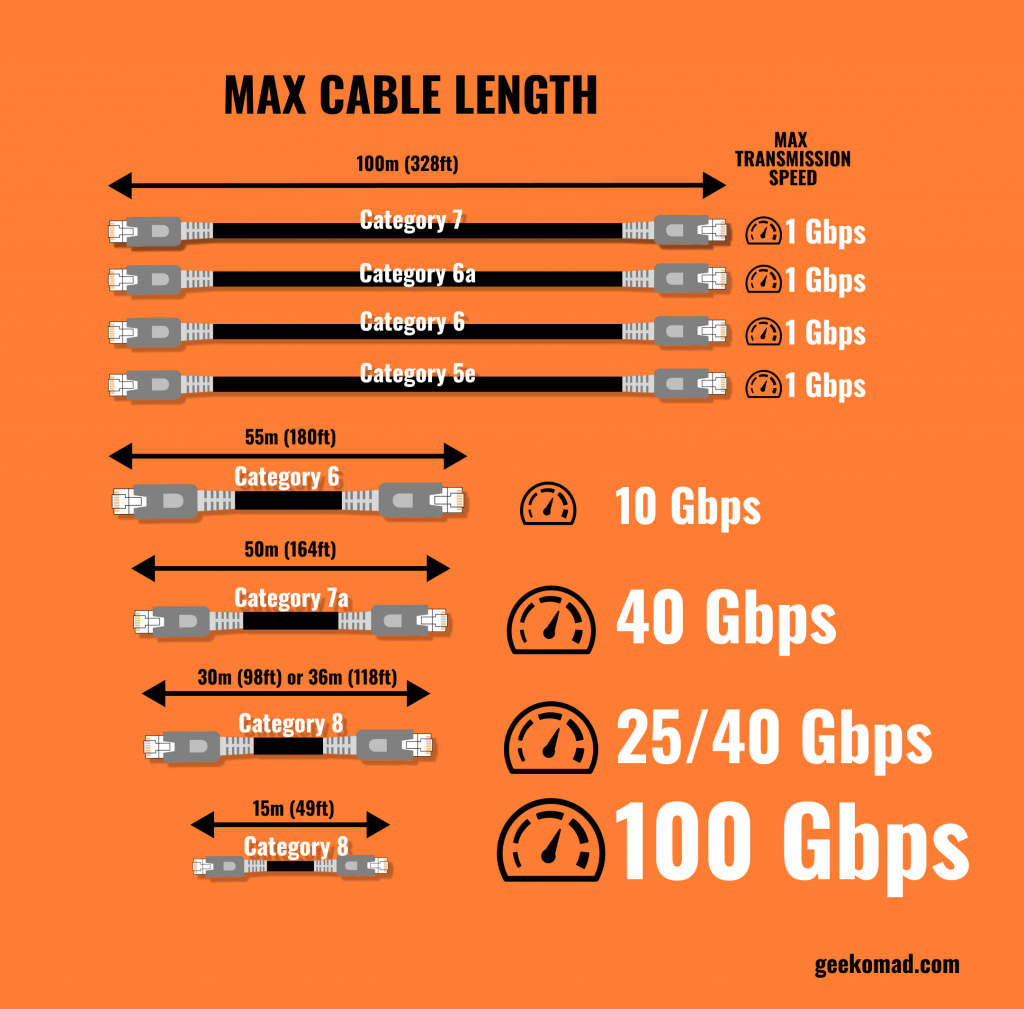
The maximum recommended length for a single Cat5e Ethernet cable run is 100 meters (or 328 feet). This is not an arbitrary number; it is a global standard set by the Telecommunications Industry Association (TIA) and Electronic Industries Alliance (EIA) in the TIA/EIA-568 specifications. This standard ensures that the cable can reliably support data transmission speeds of up to 1000 Mbps (1 Gigabit) without significant data loss.
Understanding the “Channel”: More Than a Single Cable
It’s important to understand that the 100-meter limit applies to the entire network “channel.” A channel isn’t just one long cable; it’s the complete end-to-end connection from a networking device (like a switch) to the end-user device (like a computer). The TIA standard breaks this down:
The 90-Meter Permanent Link
This is the main, solid-core cable that is installed within walls, ceilings, and conduits. The maximum length for this “backbone” cable is 90 meters (295 feet). Using a high-quality, 100% bare copper solid core cable is critical here, as it provides the best signal integrity and durability for permanent installations.
The 10-Meter Patch Cable Allowance
The remaining 10 meters (33 feet) are reserved for the flexible, stranded patch cables used at both ends of the connection. This typically includes a patch cord connecting the patch panel to the switch in the server room, and another patch cord connecting the wall outlet to your computer or device. This structure allows for flexibility and easy device changes without disturbing the permanent installation.
Why Does the 100-Meter Limit Exist? The Science Behind the Standard
The 100-meter length is dictated by physics. As electrical signals travel through copper wire, they face several challenges that weaken them over distance. Sticking to the standard ensures these issues don’t compromise your connection.
- Signal Attenuation: This is the natural weakening of a signal as it travels along the cable. Beyond 100 meters, the signal can become too weak for the receiving device to interpret correctly, leading to errors and packet loss.
- Crosstalk: In an Ethernet cable, multiple twisted pairs of wires are bundled together. Crosstalk is the unwanted “bleeding” of signal from one pair to another, causing interference. While twisting the pairs helps mitigate this, the effect becomes more pronounced over longer distances.
- Propagation Delay: This is the time it takes for a signal to travel from one end of the cable to the other. If the cable is too long, the delay can cause issues with network timing protocols, disrupting communication.
What Happens if You Exceed 100 Meters?
While a 105-meter run might seem to work initially, you are operating outside of certified standards and are likely to encounter frustrating, hard-to-diagnose problems, including:
- Reduced Speeds: Your Gigabit connection might drop to 100 Mbps or even 10 Mbps as the hardware struggles to maintain a stable link.
- Intermittent Connectivity: The connection may drop randomly, especially under heavy network load.
- Complete Connection Failure: The devices may fail to establish a link at all.
- Data Corruption: Increased packet loss means data must be re-sent, drastically slowing down your network and potentially corrupting file transfers.
How to Extend Your Network Beyond 100 Meters
If you need to cover a distance greater than 100 meters, do not simply use a longer cable. The correct approach is to “regenerate” the signal. Here are the standard-compliant ways to do it:
- Use a Network Switch: The simplest method is to place a network switch at a point within the 100-meter limit. This acts as a repeater; it receives the data and re-transmits it, effectively resetting the 100-meter clock for the next cable run.
- Convert to Fiber Optic Cable: For very long distances (hundreds or even thousands of meters), fiber optic cable is the superior solution. Use a pair of media converters to change the Ethernet signal to light, run the fiber optic cable, and then convert it back to an Ethernet signal at the other end. At D-Lay Cable, we provide a full range of high-performance fiber optic solutions for these exact scenarios.
- Use a PoE Extender: If you’re also using Power over Ethernet (PoE), a PoE extender can both regenerate the data signal and re-inject the power, allowing you to extend both data and power another 100 meters.
Frequently Asked Questions (FAQ)
Does cable quality matter for reaching the maximum length?
Absolutely. This is perhaps the most crucial factor. A low-quality cable made with Copper Clad Aluminum (CCA) will have higher resistance and will suffer from signal degradation far sooner than 100 meters. To reliably achieve the maximum length and speed, always insist on standards-compliant Cat5e cable made with 100% solid bare copper conductors, like those we manufacture at D-Lay Cable. Quality matters for performance and reliability.
Is the maximum length the same for Cat6 or Cat6a?
Yes. For standard Ethernet speeds (up to 1 Gigabit), the maximum channel length for Cat6 and Cat6a is also 100 meters. The advantage of these higher-category cables is their ability to support much higher speeds (10 Gbps) within that 100-meter distance due to better shielding and tighter wire twists, which reduce crosstalk.
Does Power over Ethernet (PoE) affect the maximum length?
No. The TIA/EIA standards for PoE are designed to work over the full 100-meter channel length of a standards-compliant cable. However, using high-quality pure copper cable is even more critical for PoE, as it handles the electrical current with less heat buildup and voltage drop compared to inferior CCA cables.
Conclusion: Quality Cabling is Key to a Reliable Network
The maximum length for a Cat5e Ethernet cable channel is a firm 100 meters (328 feet). This standard is not a suggestion; it’s a rule based on the physical properties of signal transmission that ensures your network runs at the speed and reliability you expect. Exceeding this limit will lead to performance degradation and connection instability.
For network runs that meet or approach this limit, and for any mission-critical infrastructure, the quality of your cable is non-negotiable. By choosing high-quality, standards-compliant Cat5e cable and adhering to the 90m + 10m channel rule, you are building a foundation for a powerful and trouble-free network.
If you have questions about your specific project or need premium, certified cabling solutions for any distance, contact the experts at D-Lay Cable today. We provide the building blocks for superior connectivity.