


As a leading manufacturer of high-performance network cabling, we at D-Lay Cable often encounter one fundamental question from IT professionals, home network enthusiasts, and data center managers alike: “How long can a Cat6 cable actually be?” While a simple number is often thrown around, the real answer is more nuanced and critical for ensuring a stable, high-speed network. dlaycable will provide a definitive answer, explain the factors that influence the effective length, and offer solutions for when you need to go the distance.
On This Page
The Official Standard: The 100-Meter Rule
Let’s start with the official, industry-standard answer. According to the TIA/EIA-568 standard for structured cabling, the maximum length for a single Cat6 cable channel is 100 meters (or 328 feet). This is the golden rule that ensures reliable performance under ideal conditions.
However, it’s important to understand what a “channel” consists of. It’s not just one single, long cable. The standard defines the channel as:
- The Permanent Link (Up to 90 meters): This is the main stretch of cable installed within the walls, ceiling, or conduit, running from a patch panel to a wall outlet (keystone jack).
- Patch Cords (Up to 10 meters total): This includes the patch cords at both ends of the run—one connecting the switch to the patch panel, and another connecting the computer to the wall outlet. The combined length of these cords should not exceed 10 meters.
Adhering to this 90m + 10m structure is crucial for professional installations to guarantee performance and pass certification tests.
The Critical Caveat: How Speed Affects Cat6 Length
Here is where many network plans go wrong. The 100-meter rule was primarily established with speeds up to 1 Gigabit per second (1GBASE-T) in mind. While Cat6 cable can support 10 Gigabits per second (10GBASE-T), its maximum length is significantly reduced.
- For speeds up to 1 Gbps: You can reliably use the full 100 meters (328 feet).
- For 10 Gbps speeds: The maximum supported length of a Cat6 cable drops to approximately 55 meters (180 feet). Even this distance is only achievable in environments with low “alien crosstalk”—interference from other nearby cables.
Expert Tip: If your project requires 10 Gbps speeds over distances greater than 55 meters, you must use a Category 6A (Cat6A) cable. Cat6A is specifically designed and engineered to support 10GBASE-T up to the full 100-meter distance, thanks to its superior construction and shielding against crosstalk.
Key Factors That Impact Real-World Performance
The standard assumes ideal conditions, but the real world is rarely ideal. Several factors can reduce the effective maximum length of your Cat6 cable, even for 1 Gbps speeds.
1. Cable Quality: Pure Copper vs. CCA
This is arguably the most important factor. At D-Lay Cable, we exclusively use 100% pure solid bare copper conductors in our Cat6 cables. Cheaper alternatives on the market use Copper Clad Aluminum (CCA). CCA cables have higher signal loss (attenuation) and are not compliant with TIA standards. Using a CCA cable will significantly reduce the usable length and is a common cause of network failure, especially over longer distances or with Power over Ethernet (PoE).
2. Electromagnetic Interference (EMI)
Crosstalk from adjacent network cables (alien crosstalk) and interference from high-voltage power lines, fluorescent lights, and motors can corrupt the data signal. To combat this:
- Use Shielded (STP) Cat6 Cable: In environments with high EMI, a shielded cable provides an extra layer of protection.
- Maintain Distance: Keep your network cables at least 12 inches away from parallel power lines.
3. Installation Practices
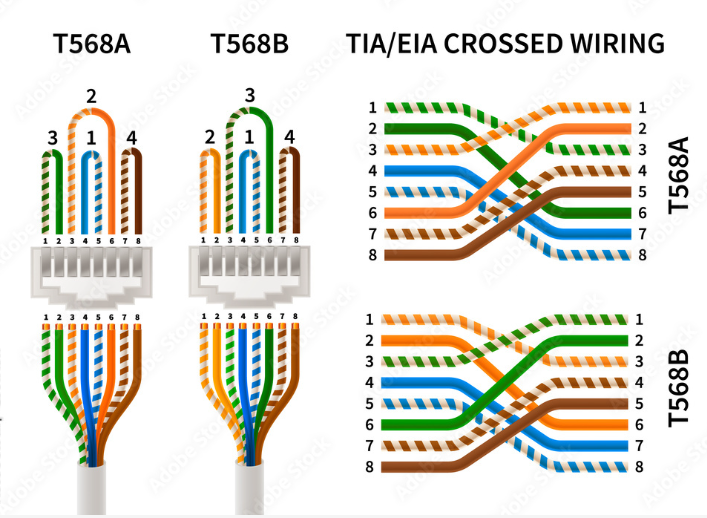
Even the highest quality cable can be compromised by poor installation. Avoid sharp bends, kinks, or stretching the cable, as this can alter its internal geometry and degrade performance. Ensure proper termination on high-quality keystone jacks and connectors.
What Happens If Your Cat6 Cable is Too Long?
Pushing a Cat6 cable beyond its recommended length isn’t a matter of it simply not working. Instead, you’ll face a range of frustrating and difficult-to-diagnose issues due to signal degradation, including:
- Slow Speeds: The network may auto-negotiate to a much slower speed (e.g., 100 Mbps instead of 1 Gbps).
- Intermittent Connectivity: The connection may drop and reconnect frequently.
- Packet Loss and Retransmission: Data packets get lost or corrupted, forcing them to be resent, which cripples overall network performance.
- Complete Connection Failure: In severe cases, no stable link can be established at all.
Need More Distance? Solutions for Going Beyond the Limit
If your networking needs require a connection longer than 100 meters, you cannot simply use a longer copper cable. The correct approach is to extend the network using active hardware or a different cable technology.
- Use a Network Switch: The simplest solution is to place a network switch at a point within the 100-meter limit. This acts as a repeater, regenerating the signal and giving you another 100-meter run from the switch onward.
- Upgrade to Fiber Optic Cable: For very long distances, high-security needs, or environments with extreme EMI, fiber optic cable is the superior choice. As a provider of both copper and fiber solutions, we can confirm that single-mode fiber can carry data for many kilometers, making it the standard for backbone and long-haul connections.
The Final Word on Cat6 Cable Length
To summarize, the maximum length of a Cat6 cable is governed by clear standards for a reason: to guarantee performance. While the rulebook says 100 meters (328 feet), this is only for speeds up to 1 Gbps under ideal conditions. For the increasingly common 10 Gbps speed, that length is cut to 55 meters (180 feet), making Cat6A the better choice for future-proofing.
Ultimately, the stability and speed of your network depend on respecting these limits and, most importantly, on the quality of the components you use. By choosing certified, pure copper cables from a trusted manufacturer like D-Lay Cable, you ensure that every meter of your installation performs exactly as it should.
Have questions about your specific project or need help selecting the right cable? Contact our team of experts today for professional guidance and high-quality cabling solutions.