


As a leading manufacturer of network cabling solutions at D-Lay Cable, we frequently answer questions about network infrastructure. One of the most common queries we encounter is: Can I use a Cat5 or Cat5e cable with Cat6 components, or vice versa?
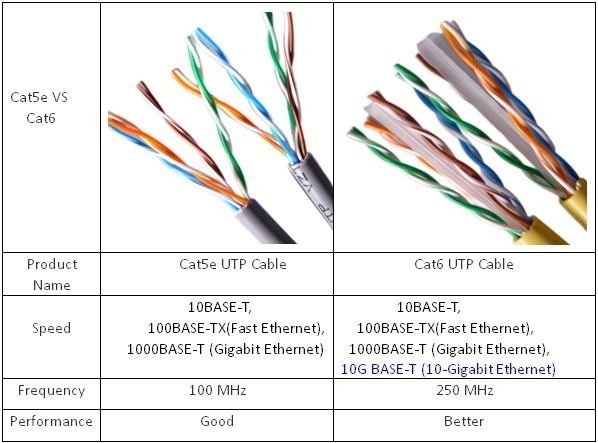
The short answer is yes, they will work together. The standards for Ethernet cabling are designed to be backward compatible. However, the full story is more nuanced, and understanding the details is crucial for achieving the network performance you expect and need.
Simply mixing and matching will not magically upgrade your network. In fact, it can create a significant bottleneck. dlaycable will walk you through how these cables interact, the performance you can realistically expect, and how to make the right choices for a reliable, high-speed network.
In This Article:
- The Quick Answer: Compatibility Explained
- The Core Differences: Why Cat6 is a Step Up from Cat5e
- The “Weakest Link” Principle: How Mixing Cables Affects Speed
- Practical Scenarios: Mixing and Matching in the Real World
- Why a Complete, Quality System Matters for Future-Proofing
- Conclusion: Making the Right Choice for Your Network
The Quick Answer: Compatibility Explained
Ethernet standards, governed by organizations like the Telecommunications Industry Association (TIA), are designed with interoperability in mind. This means a higher-category component (like a Cat6 keystone jack) can accept and function with a lower-category plug (like a Cat5e patch cable). The physical RJ45 connector is the same for both.
- A Cat6 cable will work when plugged into a Cat5e port.
- A Cat5e cable will work when plugged into a Cat6 port.
This backward compatibility ensures that you can connect devices without worrying about immediate connection failure. But while a connection will be established, the performance of that connection is another matter entirely.
The Core Differences: Why Cat6 is a Step Up from Cat5e
To understand the performance implications, you need to know what separates these two cable categories. From a manufacturing perspective, the difference isn’t just a number on the jacket; it’s a significant upgrade in construction and capability designed to handle more data with greater fidelity.
| Feature | Category 5e (Cat5e) | Category 6 (Cat6) |
|---|---|---|
| Max Data Rate | 1 Gbps (1,000 Mbps) | 10 Gbps up to 55m (180 ft), 1 Gbps at 100m |
| Bandwidth | 100 MHz | 250 MHz |
| Construction | Thinner 24 AWG copper wires, less-tightly twisted pairs. | Thicker 23 AWG copper wires, more tightly twisted pairs, and often a “spline” (a plastic divider) to separate pairs. |
| Crosstalk (Interference) | Meets minimum standards for reducing crosstalk. | Significantly stricter standards for reducing Near-End Crosstalk (NEXT) and Alien Crosstalk (AXT) due to its construction. |
Think of bandwidth (MHz) as the number of lanes on a highway and the data rate (Gbps) as the speed limit. Cat6 provides a wider, faster highway, capable of handling much more traffic with less interference, which is crucial for high-speed data transfer and stable connections.
The “Weakest Link” Principle: How Mixing Cables Affects Speed
This is the most critical concept to understand: Your network channel is only as fast as its slowest component.
A complete network “channel” includes every piece of the puzzle from the router to your computer: the patch cable, the wall jack, the cable running through the walls, the patch panel, and another patch cable. If any single one of these components is Cat5e, the entire channel will perform to Cat5e standards, regardless of how many Cat6 components are present.
Example:
[Cat6 Router] → [Cat6 Patch Cable] → [Cat5e Wall Jack] → [Cat6 In-Wall Cable] → [Your PC]
In this scenario, even with a Cat6 router and cables, the Cat5e wall jack acts as a bottleneck. The entire connection will be limited to Cat5e’s 100 MHz bandwidth and 1 Gbps speed. You have effectively paid for a sports car but are forced to drive it on a narrow country lane.
Practical Scenarios: Mixing and Matching in the Real World
Let’s look at how this plays out in common situations.
Scenario 1: Using a Cat6 Patch Cable with an Existing Cat5e Network
You have an older home or office wired with Cat5e in the walls. You buy a new Cat6 patch cord to connect your PC to the wall.
Result: The connection will work perfectly fine, but it will be limited to 1 Gbps. This is a common and acceptable use case if your internet plan is 1 Gbps or less and you don’t need faster internal network speeds.
Scenario 2: Using a Cat5e Patch Cable with a New Cat6 Network
You’ve invested in a full Cat6 infrastructure—cables, jacks, and a patch panel—to support 10 Gbps speeds for video editing or large file transfers. You then grab an old Cat5e cable to connect your server to the switch.
Result: You have just crippled your high-performance network. That specific connection will now be capped at 1 Gbps, completely negating the investment in your Cat6 system. This should be avoided at all costs.
Why a Complete, Quality System Matters for Future-Proofing
As manufacturers, we see the long-term benefits of installing a complete, matched system. While mixing and matching might work for today, it’s not a strategy for the future.
- Future-Proofing: Internet speeds are always increasing. Devices like Wi-Fi 6/6E access points, NAS devices, and 4K/8K streaming demand more bandwidth. A full Cat6 or Cat6a installation ensures your physical infrastructure won’t be the bottleneck for years to come.
- Performance and Reliability: A matched system built with high-quality components ensures minimal data errors and packet loss. The superior construction of Cat6 cabling, especially its resistance to crosstalk, provides a more stable and reliable connection for demanding applications like online gaming, video conferencing, and large data transfers.
- The D-Lay Cable Standard: It’s not just about the category number; it’s about the quality of the cable itself. We always recommend using cables with 100% pure bare copper conductors. Cheaper Copper Clad Aluminum (CCA) cables have higher resistance, break more easily, and can be a fire hazard as they are not compliant with UL safety standards. A certified, pure copper cable from a reputable manufacturer ensures you get the performance and safety you paid for.
Conclusion: Making the Right Choice for Your Network
So, will Cat5 cable work with Cat6? Yes, it will establish a connection.
But the real question you should be asking is: Will it give me the performance I need? If you are mixing categories, the answer is almost always no—you will be limited by the weakest link in the chain.
- For new installations or performance-critical environments, always install a complete, end-to-end system of the same category (Cat6 or higher).
- For existing Cat5e networks, using a Cat6 patch cable is fine, but do not expect a speed boost.
- For existing Cat6 networks, avoid using Cat5e cables, as they will bottleneck your performance.
Building a robust network foundation is a critical investment. At D-Lay Cable, we specialize in providing high-performance, certified cabling solutions that guarantee your infrastructure can meet the demands of today and tomorrow. For a reliable, full-potential network, always choose quality, certified components and plan your system for the performance you want to achieve.