


At Dlaycable, we’re not just about providing premium, high-performance cabling; we’re about empowering our customers with the knowledge to execute flawless installations. One of the most common questions we hear from network professionals and DIY installers alike is: “Exactly how many Cat6a cables can I safely run through a 1-inch conduit?”
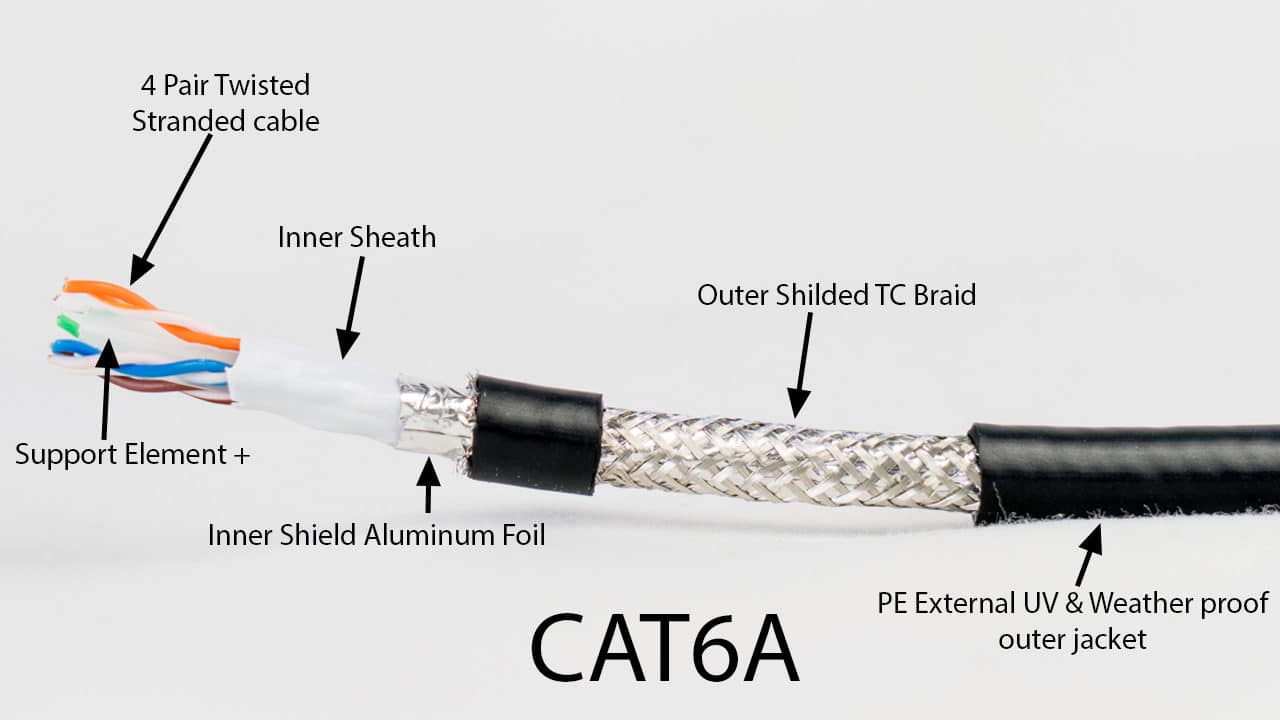
The short answer is: it depends, but a safe estimate for typical 1-inch EMT conduit is around 7-8 Cat6a UTP cables or 5-6 Cat6a STP cables.
However, simply stuffing in the maximum number of cables is a recipe for signal degradation, installation headaches, and future maintenance nightmares. To do it right, you need to understand the principles of conduit fill ratio. dlaycable will walk you through the standards, the calculations, and the practical considerations for a professional and future-proofed installation.
The Quick-Reference Chart
For those who need a quick answer, we’ve done the math for you. This chart is based on the industry-standard 40% maximum fill ratio for multiple cables, as recommended by the National Electrical Code (NEC).
| Conduit Type (1-Inch Trade Size) | Typical Cat6a UTP (0.28″ / 7.1mm OD) | Typical Cat6a F/UTP (Shielded) (0.3″ / 7.6mm OD) |
|---|---|---|
| EMT (Electrical Metallic Tubing) | 8 Cables | 6 Cables |
| PVC Schedule 40 | 7 Cables | 5 Cables |
| PVC Schedule 80 | 6 Cables | 4 Cables |
Disclaimer: These numbers are estimates. Always verify the exact Outer Diameter (OD) of your specific cable and the Inner Diameter (ID) of your conduit for the most accurate results.
Why Conduit Fill Ratio is the Golden Rule
The NEC and other standards bodies like the TIA/EIA establish fill ratios not just for neatness, but for critical reasons related to safety and performance:
- Heat Dissipation: Cables, especially those supporting Power over Ethernet (PoE), generate heat. Over-filling a conduit traps this heat, which can degrade the cable’s plastic jacket and, more importantly, increase attenuation (signal loss), leading to lower network speeds and data errors.
- Ease of Installation: Pulling cables through a tightly packed conduit creates immense friction. This can stretch the cables, altering the precise twists in the copper pairs and compromising performance. It also risks damaging the cable jackets.
- Future-Proofing: A maxed-out conduit leaves zero room for future additions or replacements. Adhering to the 40% rule ensures you have space to add another cable run later without having to install a whole new conduit.
The standard is simple: for three or more cables, the total cross-sectional area of all cables should not exceed 40% of the conduit’s total cross-sectional area.
The 2 Key Factors That Determine Cable Count
To calculate your specific limit, you only need two pieces of information: the size of your cables and the size of your conduit’s opening.
Factor 1: Your Cat6a Cable’s Outer Diameter (OD)
Not all Cat6a cables are created equal. The OD is the single most important variable. Cat6a is inherently thicker than Cat5e or Cat6 due to its larger 23 AWG conductors and the extra space required to mitigate alien crosstalk.
Cat6a UTP vs. Cat6a F/UTP (Shielded)
- Unshielded Twisted Pair (UTP): This is the most common type for general office environments. A high-quality Cat6a UTP cable, like those from Dlaycable, typically has an OD between 0.27″ and 0.29″ (7.0mm – 7.4mm).
- Foiled/Shielded Twisted Pair (F/UTP or STP): Shielded cables include a layer of foil or braid to protect against electromagnetic interference (EMI) in noisy environments like manufacturing floors or near high-power equipment. This extra layer increases the diameter, with a typical OD between 0.29″ and 0.35″ (7.4mm – 8.9mm).
Using a cable with a consistent, specified OD is crucial. At Dlaycable, we provide detailed spec sheets for all our bulk network cables so you can plan your conduit runs with precision.
Factor 2: Your Conduit’s Type and True Inner Diameter (ID)
A “1-inch” conduit does not have an inner diameter of exactly 1 inch. This is a “trade size,” and the true, usable internal space varies by the conduit’s material and wall thickness.
Common 1-Inch Conduit Types and Their Inner Diameters:
- EMT (Electrical Metallic Tubing): The most common for indoor commercial installations. It’s lightweight and has thin walls.
- Typical ID: ~1.049 inches (26.6mm)
- PVC Schedule 40: A versatile plastic conduit used in walls, ceilings, and underground.
- Typical ID: ~1.029 inches (26.1mm)
- PVC Schedule 80: A heavy-duty plastic conduit with thicker walls, offering more protection.
- Typical ID: ~0.936 inches (23.8mm)
As you can see, the heavy-duty Schedule 80 offers nearly 11% less internal area than EMT, which significantly impacts how many cables you can fit.
Doing the Math: The Conduit Fill Calculation
Ready to see how the numbers work? The formula is based on area (Area = πr²).
- Find the conduit’s allowable fill area:
(Conduit ID / 2)² * π * 0.40 = Allowable Fill Area
- Find your cable’s cross-sectional area:
(Cable OD / 2)² * π = Single Cable Area
- Divide to find the maximum number of cables:
Allowable Fill Area / Single Cable Area = Max Cables
Example: Cat6a UTP in 1-Inch EMT Conduit
- Cable OD: 0.28″
- Conduit ID (EMT): 1.049″
Step 1: (1.049 / 2)² * π * 0.40 = (0.5245)² * 3.14159 * 0.40 = 0.346 sq. in. (Allowable Area)
Step 2: (0.28 / 2)² * 3.14159 = (0.14)² * 3.14159 = 0.0616 sq. in. (Cable Area)
Step 3: 0.346 / 0.0616 = 5.6 cables
You must always round down, so the maximum is 5 cables. (Note: Our chart above is more generous because it uses slightly different average diameters, highlighting the importance of using your own product specs!)
Beyond the Numbers: Pro-Tips for Cable Pulling
A successful installation goes beyond the math. As cabling experts, we advise you to always consider these real-world factors:
- Plan for Bends: Every bend in the conduit adds significant friction. The NEC limits total bends between pull points to 360 degrees (e.g., four 90-degree bends). If your run has multiple bends, consider using a larger conduit or reducing your cable count below the 40% threshold.
- Use Cable Lubricant: A quality, non-petroleum-based lubricant designed for network cables makes pulling dramatically easier and safer for the cables.
- Leave a Pull String: Always leave a nylon pull string in the conduit for future additions. It’s a simple step that will save you immense effort down the road.
- Don’t Over-Tension: The maximum pulling tension for a Cat6a cable is around 25 lbs (110 N). Pulling harder than this can stretch the copper and ruin its performance. If it’s too hard to pull, the conduit is too full.
The Dlaycable Difference: Quality Cabling for Flawless Performance
Understanding conduit fill is a hallmark of a professional networking job. It ensures your network’s physical layer is robust, reliable, and ready for the future. By using the 40% rule and accounting for your specific cable and conduit types, you can guarantee a smooth installation and optimal performance for years to come.
At Dlaycable, we’re committed to providing not just the highest-quality Cat6a cables—with pure copper conductors and consistent diameters—but also the expert knowledge you need. Whether you’re wiring a data center or a home office, our products provide the reliable foundation your network deserves.
Have more questions or need to source premium cabling for your next project? Explore our full range of Cat6a UTP and Shielded cables or contact our expert support team today for personalized advice.