


A Category 8, or Cat8, cable is engineered to handle a maximum speed of 40 Gigabits per second (Gbps) over a channel length of up to 30 meters (approximately 98 feet). It supports an unprecedented bandwidth of up to 2000 MHz, which is four times the bandwidth of Cat6a cabling. Developed specifically for high-speed, short-distance runs within data centers, Cat8 represents the most powerful generation of twisted-pair copper Ethernet cabling defined by the ANSI/TIA-568 standard. While its capabilities are immense, its application is highly specialized. dlaycable explores the precise speeds Cat8 can achieve, how it compares to other categories, and, most importantly, helps you determine if it’s the right choice for your network infrastructure.
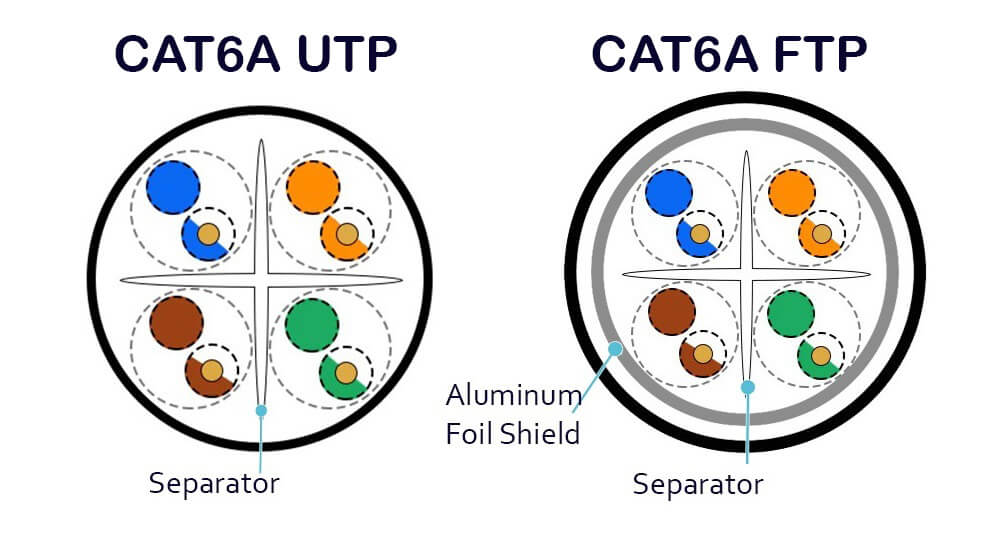
Table of Contents
- The Core Specifications: A Technical Look at Cat8 Performance
- Cat8 Speed vs. Other Categories: A Head-to-Head Comparison
- Where is Cat8 Cable Actually Used? The Ideal Applications
- Do You Need Cat8 for Your Home Network or for Gaming?
- Practical Considerations for Installing Cat8 Cable
- The DlayCable Verdict: Is Cat8 the Right Choice for You?
The Core Specifications: A Technical Look at Cat8 Performance
To truly understand Cat8, we need to look beyond the headline speed. Its performance is a result of strict engineering standards that govern its data rate, bandwidth, and physical limitations. These specifications are what distinguish it as a specialized, high-performance solution.
Unpacking the Data Rate: 25GBASE-T and 40GBASE-T
Cat8 cable is designed to support two specific Ethernet speeds, known as 25GBASE-T and 40GBASE-T. These standards, developed by the IEEE, define networking at 25 Gbps and 40 Gbps, respectively. The primary application is in data centers for server-to-switch connections, where these speeds are required to handle massive data throughput between servers and the core network. This capability allows data centers to upgrade their access layer speeds without having to perform a complete and costly migration to fiber optic cabling for these shorter links.
Why is Bandwidth (2000 MHz) So Important?
While often used interchangeably, speed and bandwidth are different. Think of speed (Gbps) as the maximum speed limit on a highway, while bandwidth (MHz) is the number of lanes. Cat8’s enormous 2000 MHz bandwidth is four times that of Cat6a (500 MHz) and twice that of Cat7 (1000 MHz). This massive “data highway” is what enables the stable transmission of 40 Gbps. The higher frequency reduces bottlenecks and allows more data to be processed simultaneously, which is critical for preventing data collisions and ensuring signal integrity at such high speeds.
The Critical 30-Meter Channel Limitation
The incredible speed of Cat8 comes with a significant trade-off: distance. Its maximum supported channel length is just 30 meters (98 feet). This channel includes the permanent link (the cable in the wall) and up to 5 meters of patch cords. The reason for this limitation is a physics principle called signal attenuation. At the extremely high frequencies of 2000 MHz, the electrical signal degrades rapidly over copper wire. To ensure a reliable, error-free 40 Gbps connection, the length must be kept short. This is why Cat8 is perfectly suited for a single row of server racks but impractical for wiring an entire office building or home.
Cat8 Speed vs. Other Categories: A Head-to-Head Comparison
Putting Cat8’s speed into perspective is best done with a direct comparison against its predecessors. Each category of Ethernet cable was designed for the networking demands of its time. As you can see in the table below, the progression in capability is dramatic, with Cat8 representing a monumental leap intended for a very specific purpose.
| Category | Max Speed | Bandwidth | Max Length | Shielding | Ideal Use Case |
|---|---|---|---|---|---|
| Cat5e | 1 Gbps | 100 MHz | 100 meters | UTP (Unshielded) | Basic home/office networking, VoIP |
| Cat6 | 1 Gbps (up to 10 Gbps < 55m) | 250 MHz | 100 meters | UTP or Shielded | Standard home/office, light commercial |
| Cat6a | 10 Gbps | 500 MHz | 100 meters | Usually Shielded (F/UTP) | High-performance home/office, AV, future-proofing |
| Cat7 | 10 Gbps | 600 MHz | 100 meters | Always Shielded (S/FTP) | *Proprietary standard, largely superseded by Cat6a/Cat8 |
| Cat8 | 40 Gbps | 2000 MHz | 30 meters | Always Shielded (S/FTP) | Data centers, server-to-switch links |
The key takeaway from this comparison is the trade-off between speed and distance. While Cat6a provides a robust 10 Gbps over the full 100 meters, Cat8 sacrifices this length to achieve a 4x increase in speed. Furthermore, Cat8 mandates full shielding (S/FTP – Screened/Foiled Twisted Pair) to protect against the extreme levels of crosstalk and electromagnetic interference (EMI) present at 2000 MHz.
Where is Cat8 Cable Actually Used? The Ideal Applications
Given its specifications, Cat8 is not an all-purpose cable. It’s a precision tool designed for environments where its unparalleled speed is a necessity, not just a luxury. Attempting to use it outside of these scenarios is often impractical and cost-prohibitive.
The Data Center Backbone
The primary and intended environment for Cat8 cabling is the modern data center. Specifically, it is used for switch-to-server interconnections within a rack or a row of racks. In a Top-of-Rack (ToR) architecture, a network switch is placed in each server cabinet, and Cat8 cables provide short, high-speed links from each server to that switch. This allows servers equipped with 25G or 40G network interface cards (NICs) to operate at full capacity, facilitating rapid data processing, high-speed storage access, and efficient virtualization.
High-Bandwidth Professional Environments
Outside of data centers, a few niche professional fields can leverage Cat8’s power. This includes high-frequency financial trading floors where every microsecond of latency counts, and professional audio/video production studios that transfer massive, uncompressed 4K or 8K video files over an IP network. In these scenarios, short, point-to-point connections require a speed that exceeds the 10 Gbps limit of Cat6a, making Cat8 a viable, though rare, solution.
Do You Need Cat8 for Your Home Network or for Gaming?
This is one of the most common questions from consumers. With marketers promoting “Cat8 for Gaming,” it’s easy to assume it offers a competitive advantage. However, from a technical perspective, the answer for almost every home user and gamer is a resounding no.
Assessing Your Home Network Reality
The vast majority of home internet connections in the world are 1 Gbps or less. A standard Cat6 cable is perfectly capable of delivering 1 Gbps, and a Cat6a cable can handle 10 Gbps—a speed that is still rare for residential internet service. Using a 40 Gbps Cat8 cable to connect to a 1 Gbps internet modem is like using a Formula 1 car to drive to the grocery store; while it works, you will never, ever use its full potential. The bottleneck is not the cable, but your internet plan and your router’s capabilities.
The Myth of “Cat8 for Gaming”: Why Latency Matters More
A smooth online gaming experience is not determined by raw bandwidth, but by low latency (or “ping”). Latency is the time it takes for a data packet to travel from your computer to the game server and back. While a stable, wired connection is crucial, any quality Ethernet cable—from Cat6 upwards—will have virtually identical, near-zero impact on latency over typical home distances. The factors that *do* affect your ping are your internet provider’s network quality, the distance to the game server, and your router’s performance. Buying a Cat8 cable will not lower your ping or give you an advantage over a player using Cat6a.
A Smarter Approach to “Future-Proofing”
For homeowners who want to ensure their network wiring remains relevant for the next decade, Cat6a is the intelligent choice. It supports 10 Gbps speeds over the full 100 meters, which is more than enough to handle the next generation of multi-gigabit home internet and all internal network traffic, like streaming from a local media server. It provides practical future-proofing without the extreme cost and installation difficulties of Cat8.
Practical Considerations for Installing Cat8 Cable
As a company that supplies these components, we at DlayCable know that a cable’s performance depends on proper installation and compatible hardware. Cat8 is particularly demanding in this regard.
Hardware and Connector Compatibility
Cat8 uses the same RJ45 connector that is ubiquitous across networking, ensuring backward compatibility with older devices. However, to achieve a certified 40 Gbps channel, every component in the line must be Cat8-rated. This includes the cable itself, the keystone jacks, the patch panels, and the patch cords. Using a Cat8 cable with Cat6 jacks, for instance, will limit the performance of the entire channel to Cat6 levels. At DlayCable, we provide end-to-end Cat8 solutions to guarantee standards compliance.
The Physical Challenge: Rigidity and Bend Radius
The robust S/FTP shielding that gives Cat8 its noise immunity also makes it significantly thicker, stiffer, and heavier than Cat6a or Cat6 cable. This rigidity makes it more difficult to pull through conduit and terminate. It also has a larger, stricter minimum bend radius, meaning it cannot be bent as sharply without damaging the internal wiring and compromising performance. Installers must be trained and equipped to handle these physical constraints properly.
The DlayCable Verdict: Is Cat8 the Right Choice for You?
Choosing the right Ethernet cable means matching the technology to the application. Cat8 is an impressive feat of engineering, but its power is best reserved for the environment it was designed for.
- For Data Center Professionals: Yes. Cat8 is the copper standard for new short-haul 25GBASE-T and 40GBASE-T deployments. It’s the right tool for building a high-speed server access layer.
- For High-End Commercial or Home “Future-Proofing”: No. Cat6a is the superior choice. It offers 10 Gbps over 100 meters, providing more than enough bandwidth for the foreseeable future at a lower cost and with greater installation flexibility.
- For a Standard Home Network or Gaming: Absolutely not. Cat8 is complete overkill. A quality Cat6 or Cat6a cable will provide 100% of the performance you need for a faster, more reliable experience than Wi-Fi.
Whether you’re building a next-generation data center or future-proofing your business network, DlayCable has the standards-compliant, high-quality cabling you need. Explore our full range of premium Cat8 and Cat6a solutions or contact our cabling experts for a personalized consultation to ensure you get the perfect solution for your project.