


Office network cabling is the structured system of cables and hardware that connects computers, phones, and other devices for data and voice communication.
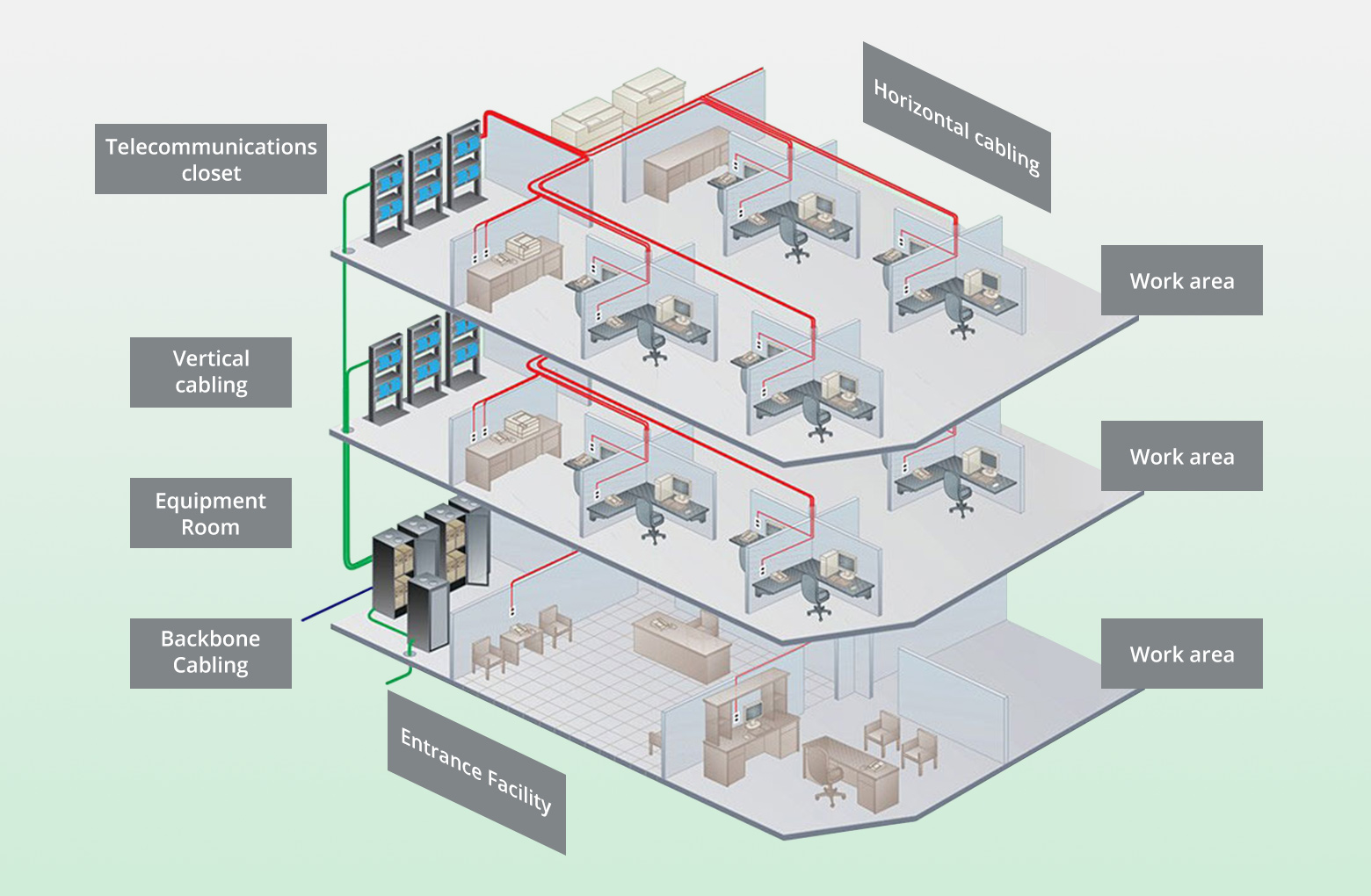
Table of Contents
- What is Structured Office Cabling?
- Why a Structured Cabling System is a Critical Business Asset
- Core Components of a Modern Office Network
- Choosing the Right Network Cables for Your Office
- The Professional Network Cabling Installation Process
- Common Cabling Mistakes and How to Avoid Them
- Future-Proofing Your Office Network Infrastructure
What is Structured Office Cabling?
Structured office cabling refers to a standardized and organized approach to an organization’s cabling infrastructure. Unlike point-to-point wiring, which creates a tangled, difficult-to-manage “spaghetti” of cables, a structured system is a comprehensive telecommunications framework. It uses a series of patch panels and trunks to create a system where hardware ports can be easily connected to a patch panel at the top of a rack. This design supports a wide variety of data, voice, and video applications.
The core principle is to install a cabling infrastructure that is independent of the equipment it will support. This means that if you need to move, add, or change your office layout or technology, the underlying network can adapt with minimal disruption or cost. It consists of several standardized subsystems, including entrance facilities, equipment rooms, backbone cabling, and horizontal cabling. Adherence to industry standards, such as those from the Telecommunications Industry Association (TIA), is paramount for ensuring interoperability and performance.
Why a Structured Cabling System is a Critical Business Asset
A well-designed network cabling system is the central nervous system of any modern business. It is not merely a utility but a long-term investment that directly impacts productivity, scalability, and operational efficiency. The initial investment in a high-quality, professionally installed system pays significant dividends over the life of your business operations.
Key advantages include enhanced performance and reliability. A structured system minimizes signal interference and downtime, ensuring consistent, high-speed connectivity for all your critical applications. It also offers incredible scalability and adaptability. As your business grows and technology evolves—from adding more employees to implementing new VoIP phones or IoT devices—a structured backbone allows you to make changes quickly and cost-effectively. Furthermore, it simplifies troubleshooting and management. With organized and labeled components, IT staff can identify and resolve issues much faster, significantly reducing costly downtime.
Core Components of a Modern Office Network
A complete structured cabling system is composed of several key hardware components that work together to create a cohesive and efficient network. Understanding these elements helps in planning an effective infrastructure that meets both current and future demands.
Patch Panels
These are centralized hardware units that contain a series of ports. They function as a static switchboard, connecting cables from individual workstations (horizontal cabling) to the main network switch or router. Patch panels are crucial for organization, allowing for easy network changes without the need to re-run or re-terminate main cable lines. They are the heart of a manageable and flexible network.
Network Switches
A network switch is an active device that connects various devices on a computer network. It uses MAC addresses to forward data to the specific device it is intended for, improving efficiency and speed compared to older hub technology. Switches come in various sizes, from small 5-port desktop models to large, rack-mounted units with dozens of ports, providing the connectivity backbone for the entire office.
Server Racks and Cabinets
Server racks and cabinets house all the critical network hardware, including patch panels, switches, servers, and routers. They provide physical security, promote airflow to keep equipment cool, and make cable management significantly easier. Proper rack selection and organization are fundamental to maintaining a clean and accessible equipment room or data closet.
Cable Management & Pathways
Effective cable management involves more than just zip ties. It includes components like horizontal and vertical cable managers, conduits, and cable trays (or ladder racks). These elements protect cables from damage, prevent kinking or excessive bending that can degrade performance, and ensure the network closet remains organized and serviceable. A clean installation is a reliable installation.
Choosing the Right Network Cables for Your Office
The type of cable used in your network is a defining factor in its performance, speed, and longevity. The choice between different categories of copper Ethernet cables and fiber optics depends on your specific needs for bandwidth, distance, and budget. Partnering with a professional installer like Dlaycable ensures you select the optimal materials for your project, meeting all performance specifications.
Copper Ethernet Cables
Twisted-pair copper cables are the standard for most horizontal cabling runs in an office—connecting wall plates to the data closet. Each successive category offers improved performance and bandwidth.
| Cable Type | Max Speed | Bandwidth | Best Use Case |
|---|---|---|---|
| Category 6 (Cat6) | 10 Gbps (up to 55m) | 250 MHz | The current standard for most new office installations, providing excellent performance for VoIP, gigabit Ethernet, and general data traffic. |
| Category 6A (Cat6A) | 10 Gbps (up to 100m) | 500 MHz | Ideal for data centers, healthcare, and businesses requiring guaranteed 10-Gigabit-Ethernet performance over longer distances. It offers better protection against crosstalk. |
| Category 7 (Cat7/7A) | 10 Gbps / 40 Gbps | 600 MHz / 1000 MHz | A highly shielded cable for environments with high electromagnetic interference. Offers forward compatibility for future network speeds beyond 10 Gbps. |
Fiber Optic Cable
Fiber optic cable transmits data using light pulses, offering significantly higher bandwidth and greater transmission distances than copper. It is completely immune to electromagnetic interference (EMI). Fiber is typically used for backbone cabling—connecting different buildings on a campus, linking floors in a high-rise, or for high-speed connections within a data center. Its superior performance makes it an essential component for future-proofing a network’s core infrastructure.
The Professional Network Cabling Installation Process
A successful office network installation follows a meticulous, multi-stage process executed by certified technicians. This systematic approach ensures that the final infrastructure is reliable, compliant with industry standards, and meets the client’s specific operational requirements. Each step is critical to the overall quality and longevity of the network.
1. Consultation and Design
The process begins with a thorough assessment of the office space and a discussion of your current and future needs. What applications will run on the network? How many users and devices need to be supported? A detailed cabling plan and blueprint are created, mapping out cable pathways, workstation outlet locations, and the layout of the server room or data closet. This planning phase is crucial for an efficient and effective installation.
2. Cable Pulling and Placement
With the plan finalized, technicians begin running the cables from the telecommunications room to the individual outlet locations. This requires careful navigation through walls, ceilings, and conduits. Professionals ensure that cables are not pulled with excessive force, kinked, or laid too close to sources of electrical interference (like power lines or fluorescent lighting), all of which can compromise signal integrity.
3. Termination and Connection
Once the cables are in place, they must be properly terminated. This involves stripping the cable jacket, untwisting the wire pairs, and carefully punching them down into wall jacks or patch panels according to TIA/EIA-568A or 568B wiring standards. Precision during termination is essential for optimal network performance. The terminated jacks are then installed in faceplates at the workstations.
4. Testing and Certification
The final and most critical step is testing every single cable run. Technicians use advanced certification testers to verify that each cable meets its specified performance standards (e.g., Cat6 or Cat6A). The tests check for things like length, wiremap, crosstalk, and insertion loss. Providing a full certification report gives you documented proof that your cabling infrastructure has been installed correctly and will perform as expected.
Common Cabling Mistakes and How to Avoid Them
Improper network cabling can lead to a host of frustrating issues, from slow speeds and intermittent connectivity to complete network failure. Avoiding these common pitfalls is essential for a reliable infrastructure. The most effective way to prevent these errors is to engage a professional firm with BICSI-certified technicians who understand the nuances of a proper installation.
One major error is exceeding the maximum cable length. For twisted-pair copper cables like Cat6, the maximum channel length is 100 meters (328 feet). Runs longer than this can suffer from signal degradation. Another frequent mistake is running data cables parallel to power cables. The electromagnetic field from high-voltage electrical lines can induce “noise” or interference in data cables, corrupting data packets and slowing down the network. A professional installer will always ensure proper separation.
Finally, poor termination and sloppy punch-downs are a primary cause of network problems. If the wire pairs are untwisted too far back from the point of connection or are not seated correctly in the jack or patch panel, it can lead to failed connections and performance issues that are difficult to diagnose. Using quality components and adhering to precise termination practices is non-negotiable for a dependable network.
Future-Proofing Your Office Network Infrastructure
Thinking about tomorrow’s needs today is the essence of future-proofing. As technologies like high-definition video conferencing, cloud computing, and the Internet of Things (IoT) place ever-increasing demands on network bandwidth, an infrastructure designed only for today’s requirements will quickly become a bottleneck. A strategic approach to cabling ensures your investment remains valuable for years to come.
A key strategy is to install higher-grade cable than you currently need. While Cat6 might suffice for today’s gigabit speeds, installing Cat6A provides a clear path to 10-Gigabit-Ethernet without needing to re-pull cables later. The incremental cost of higher-rated cable is marginal compared to the labor cost of a complete re-cabling project. Additionally, running extra cables to key locations or installing conduits with pull strings makes future additions or upgrades significantly easier and less disruptive. A professional assessment from an experienced provider like Dlaycable can identify the optimal cabling strategy to support your business’s long-term growth and technological evolution.