


The most reliable way to know if your ethernet cable is Cat6 is to examine the text printed along the cable’s outer jacket. Manufacturers are required to print identifying information, and you should be able to find text that explicitly says “CAT6,” “Category 6,” or a more technical identifier like “TIA/EIA-568-B.2-1 Category 6.” This printed text is the definitive proof of your cable’s category, removing any guesswork from the identification process.
The Easiest Way: Check the Text on the Cable Jacket
The simplest and most conclusive method to identify your ethernet cable is by reading the text printed on its sheath, or outer jacket. This is the industry-standard way of labeling cables. Run your fingers along the length of the cable and look closely at the lettering. It might be faint or small, but it contains all the critical information you need. You are specifically looking for a label that identifies the category.
The markings will typically include a variety of information, but the key identifier will be clear. Look for any of the following variations:
- CAT.6 or CAT6
- Category 6
- ANSI/TIA-568-C.2 Cat 6
Alongside the category, you may see other text such as 24AWG, which refers to the American Wire Gauge (thickness of the copper wires), and UTP (Unshielded Twisted Pair) or STP (Shielded Twisted Pair). While these are important specifications, the “CAT6” text is your primary confirmation. If you see “CAT5” or “Category 5e,” you have a different, older standard of cable.
What if the Text is Unreadable? Physical Clues to Look For
Sometimes, the text on an older cable can be worn off, or a generic, unbranded cable might lack clear markings. In these situations, you can turn to physical characteristics to make an educated guess. While these methods are not as definitive as reading the label, they can provide strong evidence about your cable’s identity.
Cable Thickness: Is It Thicker Than Usual?
One of the first physical differences you might notice is the cable’s thickness. Cat6 cables are generally thicker and less flexible than their Cat5e predecessors. This increased girth is due to a few factors: the copper conductors inside are often a slightly thicker gauge (e.g., 23AWG vs. 24AWG in Cat5e), and the insulation around each wire is more robust. This improved construction helps to minimize interference, but it also results in a bulkier cable. If you have a known Cat5 or Cat5e cable nearby, compare them side-by-side. If the unidentified cable is noticeably more rigid and thicker, it is likely a Cat6.
The Internal Spline: The Hidden Sign of a Cat6
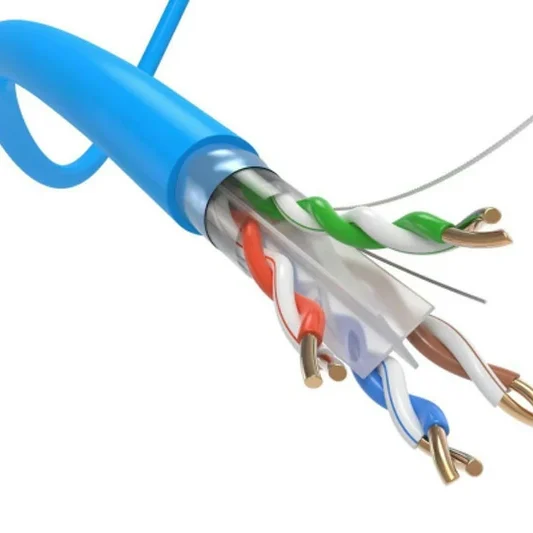
A more telling structural feature of many Cat6 cables is an internal component called a “spline.” This is a plastic cross-shaped divider that runs down the center of the cable, separating the four twisted pairs of wires. Its purpose is to physically isolate the pairs, which significantly reduces “crosstalk”—the signal interference between adjacent wires. This is a key innovation that allows Cat6 to handle higher bandwidths than Cat5e. Not all Cat6 cables have a spline (some manufacturers achieve the standard through other means), but if you were to cut open the cable and find this plastic divider, it’s an almost certain indicator that you have a Cat6 cable or better.
The RJ45 Connector: A Less Reliable Clue
The plastic plug at the end of the cable, known as the RJ45 connector, can sometimes offer a clue. To meet the higher performance standards, some Cat6-rated RJ45 connectors have a slightly different pin layout. Instead of all eight pins being in a single flat row, they may be staggered in a high-low or zig-zag pattern. This helps to further reduce crosstalk right at the point of connection. However, this is the least reliable physical check. It can be very difficult to see without magnification, and many perfectly good Cat6 cables use standard, non-staggered connectors. Therefore, use this as a supporting clue at best, not a primary identifier.
Can Performance Tell You the Cable Category?
You might wonder if you can simply test your network speed to determine your cable type. While performance is the ultimate goal, it’s an unreliable method for identification. A Cat6 cable is rated for speeds up to 10 Gbps over shorter distances (up to 55 meters) and 1 Gbps over longer distances (up to 100 meters). If your internet plan is 1 Gbps or higher and you are consistently achieving those speeds during a wired speed test, it’s a good sign you are using at least a Cat6 cable.
However, this method has a major flaw: your network speed is determined by the weakest link in your chain. If you have a Cat6 cable but your router only has 100 Mbps ports, you will only get 100 Mbps. Similarly, a slow internet plan from your provider, an old network card in your computer, or router misconfigurations can all bottleneck your speed, making a high-quality Cat6 cable perform like an older Cat5e. Therefore, a slow speed test doesn’t prove your cable is bad, and a fast one only suggests it’s *at least* capable, not definitively Cat6.
Cat6 vs. Other Categories: A Quick Comparison Chart
Understanding the key differences between common ethernet cable categories can help you identify your cable and decide if an upgrade is necessary. Here is a table breaking down the specifications of Cat5e, Cat6, and the enhanced Cat6a.
| Feature | Cat5e | Cat6 | Cat6a |
|---|---|---|---|
| Max Speed (up to 100m) | 1 Gbps | 1 Gbps | 10 Gbps |
| Max Speed (shorter distance) | 1 Gbps | 10 Gbps (up to 55m) | 10 Gbps (up to 100m) |
| Bandwidth (Frequency) | 100 MHz | 250 MHz | 500 MHz |
| Internal Spline | No | Commonly | Yes, and often shielded |
| Typical Thickness | Thinner | Thicker | Thickest |
Why Does Knowing Your Cable Category Matter?
Identifying your ethernet cable isn’t just an academic exercise. Using the right cable ensures you get the performance, stability, and reliability you’re paying for from your internet service provider and network hardware.
Achieving Maximum Internet Speed
The most direct benefit of using a Cat6 cable is unlocking the full potential of high-speed internet. If you subscribe to a multi-gigabit internet plan (anything over 1 Gbps), a Cat5e cable will act as a bottleneck, capping your wired speed at 1 Gbps. A Cat6 cable is essential for supporting these higher speeds, resulting in significantly faster downloads, smoother 4K or 8K video streaming, and a more responsive online experience.
Reducing Interference and Crosstalk
The superior construction of Cat6 cables—with tighter-twisted wires and the potential for a central spline—makes them far more resistant to interference. This includes both internal interference (crosstalk) from other wires within the cable and external interference (EMI) from power cords, fluorescent lights, and other electronic devices. The result is a more stable, consistent connection with fewer data errors and less potential for random dropouts, which is critical for online gaming and video conferencing.
Future-Proofing Your Home Network
Even if your current internet speed doesn’t exceed 1 Gbps, using Cat6 cables is a smart investment for the future. Internet speeds are constantly increasing, and network devices like routers, switches, and PCs are increasingly equipped with 2.5 Gbps or 10 Gbps ports. By wiring your home or office with Cat6, you ensure your physical infrastructure is ready to handle the next generation of internet speeds without needing a costly and disruptive overhaul.
Frequently Asked Questions (FAQ)
Can I use a Cat6 cable in a Cat5e port?
Yes, absolutely. Ethernet standards are backward-compatible. You can plug a Cat6 cable into a device or wall jack designed for Cat5e or even Cat5. The connection will simply operate at the speed of the lowest-rated component. For example, plugging a Cat6 cable into a 1 Gbps port will give you 1 Gbps.
Is it worth upgrading all my cables to Cat6?
It depends on your setup. If you have an internet plan of 1 Gbps or less and are not experiencing connectivity issues, you likely won’t see a major performance boost by replacing Cat5e with Cat6. However, if you are setting up a new network, have a multi-gigabit internet plan, or are a gamer or content creator who needs maximum stability and speed, upgrading to Cat6 is a highly recommended and cost-effective improvement.
What’s the difference between Cat6 and Cat6a?
Cat6a (Category 6 Augmented) is an enhanced standard. While Cat6 can support 10 Gbps speeds up to 55 meters, Cat6a supports 10 Gbps speeds for the full 100-meter distance. Cat6a cables also feature even more robust construction and shielding to handle the higher 500 MHz frequency, making them thicker and less flexible than standard Cat6.
Conclusion: Confirming Your Cable and Next Steps
In summary, the most definitive way to know if your ethernet cable is Cat6 is to inspect the printed text on its outer jacket. This will clearly state “CAT6” or “Category 6.” If the text is illegible, you can look for secondary clues like a thicker, more rigid build and, if visible, a staggered pin layout on the RJ45 connector. While a speed test can suggest capability, it’s not a reliable identification method due to other potential network bottlenecks. By correctly identifying your cables, you can ensure your network is performing optimally and is prepared for the faster, more demanding applications of the future.