


A Cat 7a Ethernet cable is designed for a maximum data transfer speed of 10 Gigabits per second (Gbps) over a distance of up to 100 meters. It boasts an impressive bandwidth of 1000 MHz, a significant increase over its predecessors, which allows it to handle heavy data loads with minimal interference. However, despite these powerful specifications, its practical value for home users and even many businesses is a subject of intense debate, primarily due to factors like connector types, official industry recognition, and the performance offered by more mainstream alternatives like Cat 6a and Cat 8.
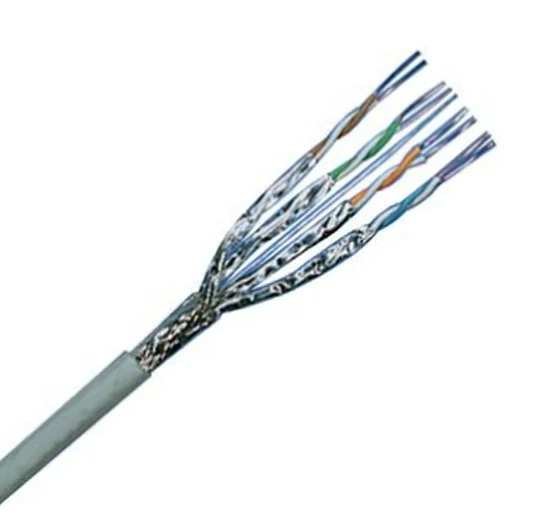
Table of Contents
- What Exactly is a Cat 7a Ethernet Cable?
- How Fast is Cat 7a, Really? A Head-to-Head Comparison
- The Critical Role of Shielding and Connectors in Cat 7a
- Who Should Use Cat 7a Cables? Practical Applications & Use Cases
- The Controversy: Why Isn’t Cat 7a TIA/EIA Recognized?
- The Final Verdict: Should You Buy a Cat 7a Ethernet Cable in 2024?
- Frequently Asked Questions (FAQ)
What Exactly is a Cat 7a Ethernet Cable?
Before diving into raw numbers, it’s crucial to understand what “Cat 7a” signifies. This designation stands for Category 7 Augmented, an advanced standard for twisted-pair copper cabling. It is defined by the international standard ISO/IEC 11801 as Class FA. Essentially, Cat 7a is an enhanced version of Cat 7, designed to push the boundaries of what copper wiring can achieve in terms of data transmission frequency and reliability, setting the stage for high-demand networking environments.
Decoding the “Category 7 Augmented” Standard
The “Augmented” in Cat 7a points to its primary improvement over the base Cat 7 standard: a higher maximum frequency. While Cat 7 operates at up to 600 MHz, Cat 7a pushes this to 1000 MHz. This expanded bandwidth doesn’t increase the top speed (which remains 10 Gbps, the same as Cat 6a and Cat 7), but it significantly enhances the cable’s ability to handle multiple high-speed data streams simultaneously without performance degradation. Think of it as a wider highway—the speed limit is the same, but more cars (data) can travel at that speed without causing a traffic jam (data bottleneck).
Key Specifications: Speed, Bandwidth, and Shielding
The performance of any Ethernet cable is defined by three core characteristics. For Cat 7a, these specifications are top-tier, but they come with important context.
- Speed (Data Rate): 10 Gbps. This is the maximum amount of data that can be transferred per second. It’s more than enough for any current residential internet plan and most business applications.
- Bandwidth (Frequency): 1000 MHz. This is the cable’s defining feature. This high frequency reduces signal attenuation and crosstalk over long distances, ensuring a more stable and reliable 10 Gbps connection compared to cables with lower bandwidth.
- Shielding: Typically S/FTP (Screened/Foiled Twisted Pair). Every Cat 7a cable must be fully shielded. This involves individual foil shielding around each of the four twisted pairs, plus an overall outer braided screen. This robust construction makes Cat 7a extremely resistant to electromagnetic interference (EMI) and radio frequency interference (RFI), which is critical in electrically noisy environments like data centers or industrial settings.
How Fast is Cat 7a, Really? A Head-to-Head Comparison
A speed of 10 Gbps is impressive, but this number exists in a competitive landscape of other Ethernet cable categories. Understanding how Cat 7a stacks up against its popular siblings—Cat 6a, Cat 7, and Cat 8—is essential for making an informed decision. The differences often lie not just in speed, but in bandwidth, cost, and intended application.
| Category | Max Speed | Max Bandwidth | Typical Shielding | Best For |
|---|---|---|---|---|
| Cat 6a | 10 Gbps up to 100m | 500 MHz | UTP or F/UTP | High-performance home networks, small/medium businesses. |
| Cat 7 | 10 Gbps up to 100m | 600 MHz | S/FTP | Data centers, AV installations (less common now). |
| Cat 7a | 10 Gbps up to 100m | 1000 MHz | S/FTP | High-frequency professional environments, future-proofing specific infrastructure. |
| Cat 8 | 25/40 Gbps up to 30m | 2000 MHz | S/FTP | Data centers, server-to-server connections. |
Cat 7a vs. Cat 6a: The Practical Upgrade
For most users, the main competitor to Cat 7a is Cat 6a (Category 6 Augmented). Both cables deliver 10 Gbps speeds over 100 meters. The primary difference is bandwidth: Cat 7a offers 1000 MHz, while Cat 6a provides 500 MHz. While Cat 7a’s superior bandwidth and mandatory shielding offer better performance in theory, a high-quality Cat 6a cable is more than sufficient for a 10 Gbps home network. Crucially, Cat 6a is an officially recognized standard by the TIA/EIA (Telecommunications Industry Association), uses the universal RJ45 connector without compromise, and is significantly more cost-effective. For this reason, Cat 6a remains the gold standard for most new high-speed residential and office installations.
Cat 7a vs. Cat 7: An Incremental Improvement
Cat 7a is a direct enhancement of Cat 7. Both offer 10 Gbps speed and require full S/FTP shielding. The only tangible upgrade is the bandwidth jump from 600 MHz in Cat 7 to 1000 MHz in Cat 7a. This makes the connection more robust and even better protected against crosstalk, especially in dense cabling environments. However, both Cat 7 and 7a share the same issues regarding non-TIA recognition and specialized connectors to achieve their full potential. For anyone considering Cat 7, opting for Cat 7a offers a slight performance edge for a similar cost and complexity, but it is a refinement, not a revolution.
Cat 7a vs. Cat 8: The Battle for Future-Proofing
Cat 8 is the true next-generation standard recognized by the TIA/EIA. It leaps ahead with speeds of 25 Gbps or even 40 Gbps, supported by a massive 2000 MHz bandwidth. However, this incredible speed comes at a cost: a much shorter maximum channel length of just 30 meters. This limitation makes Cat 8 cables unsuitable for wiring an entire office or home. Instead, they are specifically designed for short-distance, high-speed connections within a single room, such as connecting servers to switches in a data center. Therefore, Cat 7a and Cat 8 serve entirely different purposes. Cat 7a is for long-distance 10 Gbps runs, while Cat 8 is for short-distance 25/40 Gbps connections.
The Critical Role of Shielding and Connectors in Cat 7a
The high performance of Cat 7a isn’t just about the copper wires inside; it’s heavily dependent on its physical construction. The shielding and connector type are arguably as important as the speed rating itself, and they are also the source of the cable’s biggest drawbacks.
Understanding S/FTP Shielding for Maximum Noise Immunity
S/FTP (Screened/Foiled Twisted Pair) shielding is the most robust type available for Ethernet cables. In a Cat 7a cable, each of the four twisted pairs of copper wire is wrapped in its own foil shield. This is called “foiled twisted pair.” Then, all four shielded pairs are enclosed together in an overall flexible braided screen. This dual-layer of protection provides unparalleled defense against both internal crosstalk (signals from adjacent pairs interfering with each other) and external EMI/RFI (noise from power lines, fluorescent lights, motors, etc.). This makes Cat 7a an ideal choice for environments where signal integrity is paramount.
The Connector Conundrum: RJ45, GG45, and TERA
This is where Cat 7a’s biggest weakness lies for the average consumer. While nearly all Cat 7a patch cords sold on the market are terminated with the familiar RJ45 connector for backward compatibility with existing routers, switches, and PCs, this is a compromise. The original ISO/IEC standard for Cat 7/7a specifies more advanced connectors like GG45 or TERA to fully leverage the 1000 MHz bandwidth. When a Cat 7a cable is used with a standard RJ45 connector, its performance is effectively limited by the connector’s capabilities, making it perform similarly to a high-end Cat 6a cable. To unlock the full potential of Cat 7a, you would need devices with native GG45 or TERA ports, which are extremely rare outside of specialized enterprise-grade hardware.
Who Should Use Cat 7a Cables? Practical Applications & Use Cases
Given its high specifications and notable caveats, the question becomes: who actually needs a Cat 7a cable? The answer depends entirely on your specific use case.
Is Cat 7a Good for Gaming and Streaming?
Directly put, Cat 7a is overkill for gaming and streaming. Online gaming and 4K streaming require stable, low-latency connections, but they do not use a massive amount of bandwidth. A typical 4K stream needs about 25 Mbps, and online gaming uses even less. Your internet subscription speed and the latency (ping) to the server are the real bottlenecks, not your LAN cable. A reliable Cat 6 or Cat 6a cable can handle speeds up to 10,000 Mbps—far more than needed. You will see no discernible improvement in game performance or stream quality by switching from a Cat 6a cable to a Cat 7a cable.
The Case for Cat 7a in Data Centers and Professional Environments
The intended environment for Cat 7a is in high-tech professional settings. In data centers, server rooms, or audio/video production studios, multiple cables are bundled together in tight spaces, creating a high potential for crosstalk and EMI. The superior S/FTP shielding and 1000 MHz bandwidth of Cat 7a provide the signal integrity needed to ensure flawless 10 Gbps performance in these demanding, electrically noisy environments. In these scenarios, where every ounce of reliability counts, and specialized hardware might be in use, Cat 7a can be a justifiable investment.
Is Cat 7a a Smart Choice for Home Networking?
For the vast majority of home networks, Cat 7a is not a smart choice. Your home network devices—router, motherboard, smart TV, game console—all use standard RJ45 ports. This means you will never access the full theoretical potential of the Cat 7a standard. You are paying a premium for a level of shielding and bandwidth that your home environment doesn’t require and your hardware can’t fully utilize. A Cat 6a cable provides the same 10 Gbps speed, is fully certified for use with RJ45 connectors, and offers a much better price-to-performance ratio for future-proofing a home network.
The Controversy: Why Isn’t Cat 7a TIA/EIA Recognized?
A significant point of confusion is the standards recognition. Cat 7 and Cat 7a are standards from the ISO/IEC (International Organization for Standardization/International Electrotechnical Commission), which are widely adopted in Europe. However, the TIA/EIA (Telecommunications Industry Association), the primary standards body in North America, chose not to ratify the Cat 7 or Cat 7a standards. Instead, they focused their development efforts on Cat 6a and then skipped directly to Cat 8. This divergence in standards is a major reason why Cat 7a has failed to gain widespread adoption in the US market and why compatible hardware is so scarce.
The Final Verdict: Should You Buy a Cat 7a Ethernet Cable in 2024?
While the 10 Gbps speed and 1000 MHz bandwidth of Cat 7a are technically impressive, it exists in an awkward middle ground. It’s a powerful standard that has been largely overshadowed by more practical and widely adopted alternatives.
For home users, gamers, and most businesses: No. You should opt for a Cat 6a cable. It delivers the same 10 Gbps speed, is officially recognized by all standards bodies, uses the universal RJ45 connector without compromise, and is far more cost-effective. It is the perfect choice for future-proofing a network for the next decade.
For specialized data centers or high-EMI industrial settings: Maybe. If your environment demands the absolute highest level of shielding and you have the infrastructure to potentially leverage its full bandwidth, Cat 7a could be a viable option. However, even in these cases, it’s worth evaluating Cat 8 for short-run, ultra-high-speed needs or sticking with the industry-standard Cat 6a for longer 10 Gbps runs.
Frequently Asked Questions (FAQ)
- What is the maximum speed of a Cat 7a cable?
- The maximum speed of a Cat 7a cable is 10 Gbps over a distance of up to 100 meters (328 feet).
- Can I use a Cat 7a cable with my PS5 or PC?
- Yes, you can. Cat 7a cables are backward compatible and will work with any device that has a standard RJ45 Ethernet port. However, you will not experience any performance benefit over a good quality Cat 6a cable.
- Is Cat 7a faster than Cat 8?
- No, Cat 7a is not faster than Cat 8. Cat 7a is rated for 10 Gbps, while Cat 8 is rated for 25 or 40 Gbps, although over a shorter distance (30 meters).
- What is the main advantage of Cat 7a over Cat 6a?
- The main advantages are a higher bandwidth (1000 MHz vs. 500 MHz) and mandatory, more robust S/FTP shielding. This provides better protection against interference but doesn’t increase the top speed.