


The best surveillance system cable depends on your camera type. Modern IP cameras use Ethernet (CAT5e/CAT6) for data and power, while analog systems rely on Siamese coaxial cable.
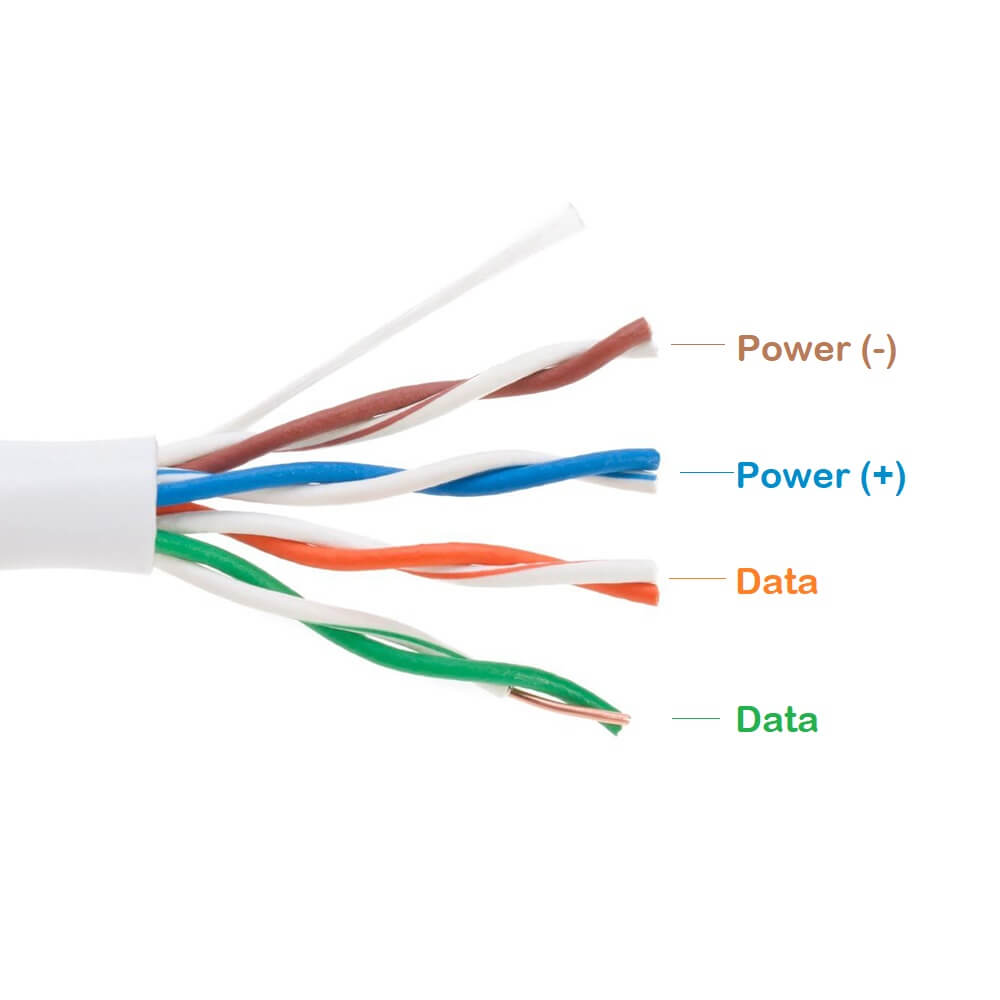
Table of Contents
- What Determines the Best Cable for Your Security System?
- Cabling Solutions for IP Surveillance Systems
- The Backbone of Analog and HD-over-Coax Systems
- Critical Factors for Cable Selection and Installation
- Frequently Asked Questions about Security Camera Wiring
What Determines the Best Cable for Your Security System?
Choosing the right wiring for your surveillance setup is fundamental to its performance and reliability. The decision primarily hinges on the type of security system you are installing: a modern digital Internet Protocol (IP) system or a traditional Analog (CCTV/HD-over-Coax) system. Each technology has a dedicated cabling infrastructure designed to deliver optimal video quality and power.
IP systems, which send video data over a network, utilize Ethernet cables. These cables are prized for their ability to transmit large amounts of digital data and, through Power over Ethernet (PoE) technology, deliver electricity to the cameras over the same wire. This simplifies installation significantly. Analog systems, including newer high-definition formats like HD-CVI and HD-TVI, transmit video signals over coaxial cable. To power the cameras, a separate power wire is required, which is often bundled with the coax in a format known as Siamese cable.
Cabling Solutions for IP Surveillance Systems
For any IP-based security camera network, structured cabling like Category 5e (CAT5e) or Category 6 (CAT6) is the standard. This type of wiring forms the digital highway for video data from your cameras to your Network Video Recorder (NVR) or server. The primary advantage of this setup is its integration with existing network infrastructure and its ability to support high-resolution video streams with minimal signal degradation.
Understanding Power over Ethernet (PoE)
Power over Ethernet (PoE) is a transformative technology in the surveillance industry. It allows a single Ethernet cable to provide both the data connection and the electrical power required to operate an IP camera. This eliminates the need for a separate power outlet near each camera location, dramatically reducing installation complexity and cost. A PoE-capable network switch or NVR injects low-voltage power into the Ethernet cable, which the camera then uses to operate.
The simplicity of a one-cable solution makes system expansion straightforward and allows for greater flexibility in camera placement. When implementing a PoE system, it is crucial to ensure both your camera and your switch/NVR are PoE-compliant and that the total power budget of the switch can support all connected devices.
Which Ethernet Cable is Right? CAT5e vs. CAT6
The two most common choices for IP cameras are CAT5e and CAT6. While both are capable, they have key differences in performance that can impact your system’s capabilities, especially as camera resolutions increase. Future-proofing your installation is often a wise consideration.
CAT5e (Category 5e) is sufficient for most current 1080p and 4K camera installations, supporting speeds up to 1 Gigabit per second (Gbps) and frequencies up to 100 MHz. It is typically more affordable and flexible, making it a popular choice for residential and small commercial projects. CAT6 (Category 6) offers superior performance, with support for speeds up to 10 Gbps and frequencies up to 250 MHz. This additional bandwidth reduces crosstalk (interference between wire pairs) and provides more headroom for future technologies and higher-resolution cameras. For new, large-scale, or commercial-grade installations, CAT6 is the recommended choice.
| Feature | CAT5e | CAT6 |
|---|---|---|
| Max Speed (at 100m) | 1 Gbps | 10 Gbps (at shorter distances, 1 Gbps at 100m) |
| Bandwidth | 100 MHz | 250 MHz |
| Best Use Case | Residential and small business IP systems with 1080p/4K cameras. | Commercial installations, systems with high camera density, and future-proofing for resolutions beyond 4K. |
Shielded (STP) vs. Unshielded (UTP) Cables
Ethernet cables also come in unshielded and shielded varieties. Unshielded Twisted Pair (UTP) is the standard for the vast majority of indoor installations, including homes and offices, where electromagnetic interference (EMI) is not a concern. The twisted-pair design inherently cancels out most minor interference.
Shielded Twisted Pair (STP) cables include an additional foil or braided shield around the wires. This shielding provides protection against significant EMI, which can be generated by heavy machinery, high-voltage electrical lines, or fluorescent lighting ballasts. STP cable should be used in industrial environments or any setting where data integrity could be compromised by external electronic “noise.”
The Backbone of Analog and HD-over-Coax Systems
Analog and HD-over-Coax systems transmit video as an analog signal through coaxial cable to a Digital Video Recorder (DVR). While older standard-definition systems are becoming less common, HD-over-Coax technology provides an excellent upgrade path for existing coaxial infrastructure, delivering high-definition video without requiring a complete system overhaul.
What is Siamese Cable?
Siamese cable is the most efficient wiring solution for analog surveillance systems. It consists of two cables joined together in a single jacket: a coaxial cable (typically RG59) for transmitting the video signal and a pair of power wires (commonly 18-gauge 2-conductor, or 18/2) for delivering power to the camera. This bundled design simplifies the installation process by allowing you to run a single cable pull to each camera location instead of two separate wires.
Using a quality Siamese cable, such as the options available from D-Lay Cable, ensures that both the video signal and the power delivery are robust and reliable. The video signal is terminated with a BNC connector, while the power wires connect to a power supply box or an individual power adapter.
RG59 vs. RG6: Making the Correct Choice
The most common coaxial cable used for CCTV is RG59. It has a thinner center conductor and is more flexible, making it easier to pull and terminate in tight spaces. It is the industry standard and is perfectly suited for transmitting HD video signals over distances up to approximately 750 feet with minimal signal loss.
RG6 cable features a thicker conductor and better shielding, which allows it to carry signals over longer distances with less attenuation. While it is the standard for cable television (CATV), it is generally considered overkill for most surveillance applications. Its rigidity can make it more difficult to work with. RG6 should only be considered for exceptionally long camera runs, typically exceeding 750-1,000 feet.
Critical Factors for Cable Selection and Installation
Beyond choosing between Ethernet and Siamese, other material and environmental factors profoundly affect system performance, safety, and longevity. Paying attention to these details separates a professional, reliable installation from a problematic one.
The Importance of Solid Copper Conductors
The material of the core conductor wire is paramount. Always insist on cable with 100% solid bare copper conductors. Cheaper alternatives, known as Copper Clad Aluminum (CCA), use an aluminum core coated with a thin layer of copper. CCA cables have higher electrical resistance, which causes excessive voltage drop, poor power delivery for PoE and analog cameras, and increased heat buildup.
Furthermore, CCA is brittle, prone to breaking during installation, and not compliant with TIA and NEC safety and performance standards. For a secure and dependable connection that delivers consistent power and a clean video signal, using high-grade solid copper cable from a trusted supplier like D-Lay Cable is non-negotiable.
Understanding Cable Jacket Ratings: Plenum vs. Riser vs. CM
Building and fire codes mandate specific cable jacket types based on where the cable will be installed. These ratings relate to the materials’ fire resistance and smoke production. Using the wrong type can result in failed inspections and significant safety hazards.
- Plenum (CMP): This is the highest rating. Plenum-rated cable must be used in any “plenum” spaces—areas that handle air circulation for heating and air conditioning, such as drop ceilings and raised floors. The jacket is made from low-smoke, fire-retardant materials.
- Riser (CMR): Riser-rated cable is designed for runs in non-plenum vertical shafts between floors. It is engineered to prevent the spread of fire from one floor to the next.
- General Purpose (CM/CMG): This is a standard jacket rating for general-purpose horizontal wiring on a single floor where neither plenum nor riser ratings are required.
Preparing for Outdoor and Harsh Environments
When installing cameras outdoors, standard indoor-rated cable is insufficient. Exposure to sunlight, moisture, and temperature fluctuations will quickly degrade the jacket and compromise the conductors. For these applications, you must use outdoor-rated or direct-burial cable. This type of cable features a CMX-rated jacket that is resistant to UV radiation and moisture. For installations that will be buried underground, direct-burial cable often includes a waterproof gel filling or tape to protect the inner wires from water ingress, ensuring the long-term integrity of your system.
Frequently Asked Questions about Security Camera Wiring
What is the maximum length for a security camera cable run?
For IP cameras using Ethernet and PoE, the maximum standardized distance is 100 meters (328 feet). For analog systems using high-quality RG59 Siamese cable, runs can typically go up to 750 feet without significant signal degradation. Longer runs may require signal boosters or a switch to RG6 or fiber optic cable.
Can I use existing coaxial cable for new IP cameras?
Yes, it is possible using devices called Ethernet over Coax (EoC) converters or baluns. These adapters allow you to transmit IP data over existing RG59 or RG6 wiring. However, bandwidth and PoE capabilities may be limited compared to a native Ethernet installation, so it is best suited for situations where re-cabling is not feasible.
Do I need special tools to install security camera cables?
Yes, proper installation requires specific tools. For Ethernet cabling, you will need an RJ45 crimper, a wire stripper, and a punch-down tool for keystone jacks. For coaxial cable, you will need a coaxial cable stripper and a BNC compression or crimping tool to attach the connectors securely.