


Yes, you can absolutely plug a Cat7 cable into a Cat6 port, jack, or any other Cat6 component. The connection will work perfectly fine because Ethernet standards are designed to be backward compatible. The physical connector, known as the RJ45 connector, is the same for both Cat6 and Cat7 cables. However, it’s crucial to understand that your network’s performance will be limited by the lowest-rated component in the chain. In this case, your connection will operate at Cat6 speeds and frequencies, not the higher specifications of the Cat7 cable.
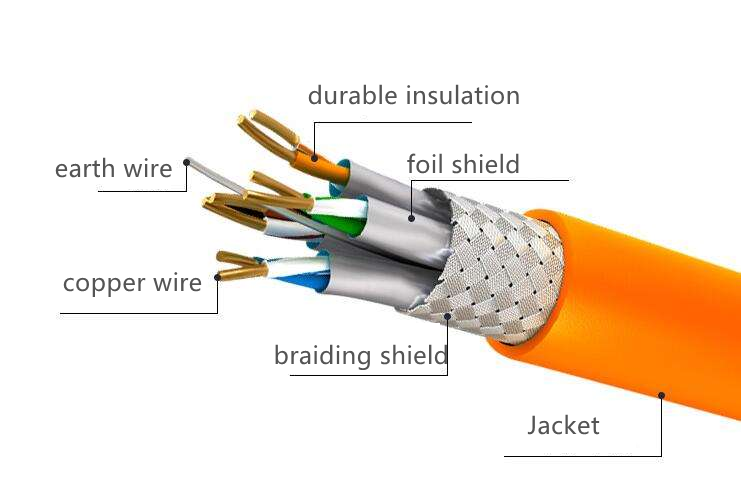
Table of Contents
- The Short Answer: A Matter of Backward Compatibility
- Understanding the Key Differences: Cat7 vs. Cat6
- What Happens When You Plug a Cat7 Cable into a Cat6 System?
- Practical Scenarios: When Should You Use This Combination?
- Is There a Better Alternative? Enter Cat6a
- Final Verdict: Should You Plug a Cat7 Cable into a Cat6 Port?
- Frequently Asked Questions (FAQ)
The Short Answer: A Matter of Backward Compatibility
The world of network cabling is built on a foundation of interoperability and backward compatibility. This means newer standards are intentionally designed to work with older ones. When you plug a Category 7 (Cat7) Ethernet cable into a Category 6 (Cat6) port, the connection is physically identical. Both categories, for most consumer and commercial applications, utilize the ubiquitous RJ45 connector. This shared connector ensures you can plug and unplug these cables without any physical issues.
The “handshake” process between your devices will automatically negotiate the highest possible speed that all components can support. Because the port is Cat6, the entire connection defaults to Cat6 performance standards. Think of it like connecting a high-performance sports car engine to the transmission of a family sedan—the car will only go as fast as the transmission allows. The potential of the engine is still there, but it can’t be fully realized.
Understanding the Key Differences: Cat7 vs. Cat6
To fully grasp why the performance is capped, it’s essential to understand what separates these two cable categories. While they may look similar, their internal construction and capabilities are significantly different, impacting everything from speed to resistance against electronic noise.
Speed and Bandwidth: The Performance Gap
The most cited difference lies in their data-handling capabilities. Bandwidth, measured in Megahertz (MHz), refers to the range of frequencies a cable can carry, which directly impacts the amount of data it can transmit at once.
- Cat6 Cables: Are specified to support speeds up to 1 Gigabit per second (Gbps) over 100 meters, with a bandwidth of 250 MHz. In some shorter-distance applications (under 55 meters), it can support 10 Gbps, but this is not its primary design standard.
- Cat7 Cables: Represent a significant leap forward, designed for speeds of 10 Gbps over the full 100 meters, with a much higher bandwidth of 600 MHz. This increased bandwidth allows for more data to be transmitted simultaneously with less chance of errors.
Shielding and Construction: A Tale of Two Designs
The secret to Cat7’s superior performance is its stringent shielding requirements. Shielding is a protective layer, usually made of foil or braided metal, that wraps the inner copper wires to protect them from interference.
- Cat6: Commonly comes in Unshielded Twisted Pair (UTP) form, which is sufficient for most home and office environments. Shielded Twisted Pair (STP) versions are available but less common.
- Cat7: Mandates comprehensive shielding. Every Cat7 cable is a Shielded/Foiled Twisted Pair (S/FTP) cable. This means each of the four twisted pairs of wires is wrapped in foil, and then an overall braided shield wraps the entire bundle. This dual-layer shielding makes Cat7 highly resistant to crosstalk (interference between wire pairs) and electromagnetic interference (EMI) from sources like power lines, motors, and fluorescent lights. This robust construction also makes Cat7 cables thicker, stiffer, and more challenging to install than their Cat6 counterparts.
The Connector Controversy: RJ45 vs. GG45
Here’s a point of technical nuance that often causes confusion. The official ISO/IEC standard for Cat7 cabling actually specifies a connector called a GG45 (GigaGate 45). It’s a more complex connector that is backward compatible with RJ45 but has extra contacts to achieve the full 600 MHz+ performance. However, the GG45 connector never achieved widespread market adoption. As a result, almost all “Cat7” cables sold today are terminated with standard RJ45 connectors to ensure they can be used with the vast majority of existing network hardware. While this makes them practical, it technically means they don’t meet the full, formal Cat7 standard. For all practical purposes, the Cat7 cable you buy will have the same RJ45 plug as a Cat6 cable.
What Happens When You Plug a Cat7 Cable into a Cat6 System?
When you connect these two different categories, the outcome is determined by a simple, universal network principle. The result is a fully functional, but not fully optimized, connection.
Performance Limitations: The “Weakest Link” Principle
In any network run, the overall performance is dictated by the component with the lowest specification. This is known as the “weakest link” principle. Your network data path includes the cable, the port on your device (computer, router, switch), the wall jack, and any patch panels in between. If any one of these components is rated for Cat6, the entire path from end to end will operate at Cat6 speeds (1 Gbps, 250 MHz).
You will not damage your equipment by doing this. The cable and the port are designed to negotiate a common standard. The Cat7 cable simply scales down its performance to match what the Cat6 port can handle. You are paying for a 10 Gbps cable but will only get 1 Gbps performance out of it in this specific setup.
| Component Combination | Resulting Performance | Explanation |
|---|---|---|
| Cat7 Cable in Cat6 Port | Cat6 Performance (1 Gbps, 250 MHz) | The Cat6 port is the bottleneck, limiting the speed. |
| Cat6 Cable in Cat7 Port | Cat6 Performance (1 Gbps, 250 MHz) | The Cat6 cable is the bottleneck, limiting the speed. |
| Cat7 Cable in Cat7 Port | Cat7 Performance (10 Gbps, 600 MHz) | All components match, allowing for maximum performance. |
Are There Any Benefits to Using a Cat7 Cable in a Cat6 Network?
Surprisingly, yes. While you won’t get a speed boost, you might see a more stable and reliable connection, especially in certain environments. The primary benefit comes from Cat7’s superior shielding. If your cable run passes near power cords, electric motors, fluorescent lighting, or other sources of EMI, the enhanced shielding of the Cat7 cable can do a better job of protecting the data integrity. This can result in fewer packet errors and a more consistent 1 Gbps connection compared to an unshielded Cat6 cable in the same noisy environment.
Practical Scenarios: When Should You Use This Combination?
While not ideal for maximizing performance, there are several logical reasons you might find yourself plugging a Cat7 cable into a Cat6 port.
Future-Proofing Your Network Infrastructure
This is the most common reason. Perhaps you are installing cables in walls or ceilings where they will be difficult to replace later. By installing Cat7 cables now, you are preparing your physical infrastructure for a future where all your network devices (routers, switches, network cards) are 10 Gbps-capable. When you eventually upgrade your hardware, the cabling will already be in place to support the higher speeds without needing a costly and disruptive re-cabling project.
Mitigating Noise in High-Interference Environments
As mentioned above, if you’re running a cable in a “noisy” area—like a workshop, a media cabinet packed with electronics, or alongside electrical conduit—using a Cat7 cable is a smart choice. The robust S/FTP shielding provides an extra layer of defense against interference, ensuring a cleaner signal even when the end-to-end speed is limited to Cat6 levels.
When It’s Simply What You Have on Hand
Sometimes, the simple answer is the right one. If you need a 10-foot patch cord and the only one you have is a Cat7, there is absolutely no harm in using it to connect to your Cat6 network. It will work just as well as a Cat6 cable would for that connection.
Is There a Better Alternative? Enter Cat6a
For many users looking to upgrade beyond 1 Gbps, Category 6a (Cat6a) is often the recommended “sweet spot.” Cat6a is an augmented standard that is officially recognized by the TIA/EIA (the primary standards body in North America), unlike Cat7.
Cat6a is specifically designed to deliver reliable 10 Gbps performance over the full 100-meter distance with a bandwidth of 500 MHz. It uses the standard RJ45 connector and offers a great balance of performance, cost, and practicality. Cat6a cables are better shielded than standard Cat6 but are often more flexible and easier to terminate than the bulkier Cat7 cables, making them a preferred choice for new 10 GbE installations in both homes and businesses.
Which should you choose? If your goal is a 10 Gbps network, and you’re buying new components, Cat6a is the industry-standard choice. If you are focused heavily on future-proofing past 10 Gbps or require the absolute best shielding available, Cat7 remains a viable, albeit less standard, option.
Final Verdict: Should You Plug a Cat7 Cable into a Cat6 Port?
The answer is a confident yes. It is safe, functional, and governed by the principle of backward compatibility. The RJ45 connectors are identical, ensuring a secure physical link. Just remember that your network’s speed will be capped by the Cat6 components. You gain no immediate speed benefits, but you may get a more reliable signal in noisy environments due to the Cat7 cable’s superior shielding. For new installations aiming for 10 Gbps, Cat6a often presents a more practical and standards-compliant alternative.
Frequently Asked Questions (FAQ)
- Will a Cat7 cable slow down my Cat6 network?
- No. It will not slow your network down. It will simply operate at the maximum speed your Cat6 network supports, which is typically 1 Gbps.
- Are Cat7 connectors the same as Cat6?
- For all practical purposes, yes. While the formal Cat7 standard specified a different connector (GG45), nearly all Cat7 cables sold today use the same RJ45 connector as Cat6 for universal compatibility.
- Can I plug a Cat6 cable into a Cat7 port?
- Yes, the same principle applies. A Cat6 cable will work in a Cat7 port, but the connection will be limited to Cat6 performance because the cable itself is the “weakest link.”
- Is Cat7 worth it for gaming?
- For gaming, a stable connection is more important than raw speed beyond 1 Gbps, as most internet plans and game servers don’t require more. A high-quality Cat6 or Cat6a cable is more than sufficient for a lag-free gaming experience. The main benefit of Cat7 would be its shielding in an environment with high electronic interference.