


Yes, you can run Cat7 cable next to power lines, primarily because its advanced shielding is specifically designed to resist electromagnetic interference (EMI). However, simply using a Cat7 cable is not a guarantee of a perfect connection. To prevent signal degradation, packet loss, and slow network speeds, you must adhere to critical installation best practices, including maintaining proper separation distances, crossing power lines at 90-degree angles, and ensuring the cable’s shield is correctly grounded.
You’re planning a network installation, and the most convenient cable path runs right alongside electrical wiring. This common scenario raises a crucial question for anyone seeking a high-performance network: will the power cables interfere with my Ethernet signal? While this is a major concern for unshielded cables like Cat5e or Cat6, the robust design of Cat7 changes the equation. This guide provides a comprehensive, in-depth look at how to safely and effectively run Cat7 cable near power sources, ensuring you get the full speed and stability you’re paying for.
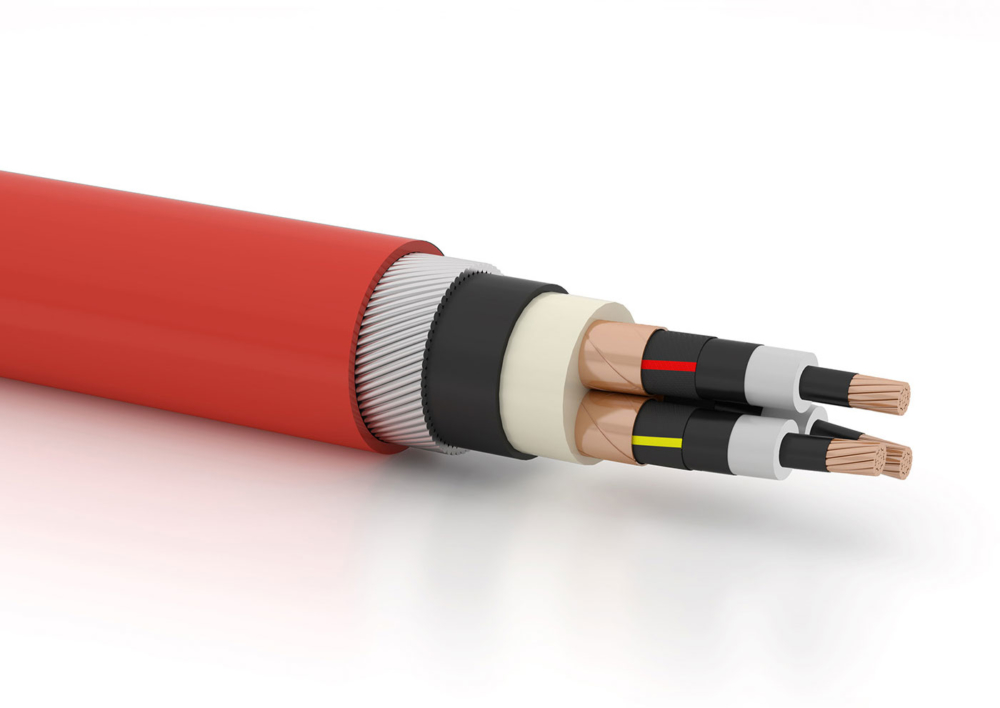
Table of Contents
- Understanding the Core Problem: Electromagnetic Interference (EMI)
- What Makes Cat7 Different? A Deep Dive into Shielding
- The Golden Rules: Best Practices for Running Cat7 Near Power Lines
- The Critical, Often-Missed Step: Proper Grounding and Termination
- Cat7 vs. Cat6a: Which is Truly Better for Resisting Interference?
- How to Test for and Identify Interference in Your Network
- Frequently Asked Questions (FAQ)
- Final Verdict: Running Cat7 Near Power is Possible with a Plan
Understanding the Core Problem: Electromagnetic Interference (EMI)
Before diving into solutions, it’s essential to understand the enemy. The entire reason we worry about running data cables near power lines is a phenomenon called Electromagnetic Interference, or EMI. It’s the invisible force that can corrupt your data and cripple your network performance.
What is EMI and Why Does It Affect Ethernet Cables?
Ethernet cables transmit data using low-voltage electrical signals that represent binary code (1s and 0s). These signals travel through twisted pairs of copper wires. EMI, often called “noise,” is an unwanted electrical or magnetic disturbance that can disrupt this data flow. When a powerful magnetic field from a nearby source—like a power cable—passes through an Ethernet cable, it can induce a small electrical current in the copper wires. This induced current interferes with the original data signal, potentially “flipping” a 1 to a 0 or vice versa. This corruption leads to data errors, forcing the receiving device to request a retransmission of the data packet, which manifests as packet loss, increased latency (ping), and reduced overall bandwidth.
How Do Power Cables Generate EMI?
Any cable carrying an alternating current (AC), which is the standard for household and office electrical systems, generates a fluctuating magnetic field around it. The strength of this field depends on two main factors: the voltage and the amount of current flowing through the wire. High-power devices like air conditioners, microwaves, fluorescent light ballasts, and large motors are significant sources of EMI. Running a data cable parallel to a high-voltage or high-current power line creates a scenario of prolonged exposure, maximizing the potential for interference.
What Makes Cat7 Different? A Deep Dive into Shielding
The primary advantage of Cat7 and other shielded cables is their built-in defense against EMI. Unlike their unshielded counterparts (UTP – Unshielded Twisted Pair), they incorporate physical barriers designed to block and dissipate this disruptive energy.
The Anatomy of a Cat7 Cable (S/FTP Explained)
Category 7 cables feature the most robust shielding configuration available in consumer and enterprise networking. The technical term for this is S/FTP, which stands for Screened/Foiled Twisted Pair.
- Foiled Twisted Pair (FTP): Each of the four individual twisted pairs of copper wire inside the cable is wrapped in its own layer of foil. This initial shield protects the pair from interfering with its neighbors (crosstalk) and provides the first line of defense against external EMI.
- Screened (S): After each pair is individually shielded, all four pairs are encased together in an overall high-coverage braid screen made of tinned copper or aluminum. This outer screen provides a powerful second layer of protection against high-frequency and low-frequency EMI from external sources like power lines and motors.
This dual-layer shielding makes Cat7 exceptionally resilient to noise, far surpassing the capabilities of unshielded Cat5e and Cat6, and even offering a step up from some shielded Cat6a variants.
How Shielding Actively Combats EMI
The shield on a Cat7 cable functions like a protective bubble. When an external magnetic field (EMI) hits the cable, it encounters the outer braid screen first. This screen absorbs the electromagnetic energy and, if properly grounded, safely conducts it away to the ground, preventing it from ever reaching the delicate data-carrying wires inside. Any residual noise that might penetrate the outer screen is then dealt with by the individual foil shields around each twisted pair. This multi-stage defense system effectively neutralizes the threat of EMI, preserving the integrity of the data signal even in electrically noisy environments.
The Golden Rules: Best Practices for Running Cat7 Near Power Lines
Even with Cat7’s superior shielding, following industry best practices is non-negotiable for a professional and reliable installation. These rules are designed to minimize risk and maximize performance.
Rule #1: Maintain Proper Separation Distance
The strength of a magnetic field decreases exponentially with distance. Therefore, the simplest and most effective way to reduce interference is to keep your Cat7 cable as far away from power lines as possible, especially on long, parallel runs. While Cat7’s shielding makes it very forgiving, these are the general guidelines to follow.
| Cable Type & Scenario | Recommended Minimum Distance from Power (<480V) |
|---|---|
| Cat7/Cat6a (Shielded) parallel to power | 2-5 inches (5-12 cm) |
| Unshielded Cable (Cat5e/Cat6) parallel to power | 8-12 inches (20-30 cm) |
| Any Ethernet cable parallel to power in metal conduit | 1-2 inches (2.5-5 cm) |
| Any Ethernet cable near fluorescent lighting or motors | At least 12 inches (30 cm) |
Always consult local building and electrical codes, which may have specific requirements for separating low-voltage and high-voltage wiring.
Rule #2: Cross at a 90-Degree Angle
There will be times when your Ethernet cable must cross a power line. When this is unavoidable, always ensure the cables cross at a perpendicular (90-degree) angle. The principle here is to minimize the surface area of parallel exposure. A 90-degree crossing ensures the data cable passes through the magnetic field as quickly as possible, drastically reducing the potential for induced current and interference. Avoid crossing at shallow angles, as this more closely mimics a parallel run and increases the risk of noise.
Rule #3: Use Conduit for Maximum Protection
Using a conduit (a tube for protecting and routing wiring) provides an additional layer of physical and electrical protection. While PVC conduit helps with cable management, metal conduit (such as EMT – Electrical Metallic Tubing) is far superior for EMI protection. The metal tube acts as a Faraday cage, effectively blocking and grounding external electromagnetic fields before they can even reach the Cat7 cable’s own shielding. If you absolutely must run data and power very close together, placing the power cable, the data cable, or both in separate metal conduits is the ultimate solution for interference mitigation.
The Critical, Often-Missed Step: Proper Grounding and Termination
This is arguably the most important and most frequently overlooked aspect of installing shielded cable. The impressive shielding on a Cat7 cable is completely useless—and can even be detrimental—if it is not properly grounded.
Why an Ungrounded Shield Can Be Worse Than No Shield
The shield works by absorbing EMI and shunting that electrical noise to the ground. If the shield is not connected to a ground, that captured energy has nowhere to go. In this state, the shield itself effectively becomes an antenna, concentrating the EMI and radiating it directly into the twisted pairs it was meant to protect. This can induce even more noise than if you had used an unshielded cable, completely defeating the purpose of paying extra for Cat7.
How to Properly Ground Your Cat7 Installation
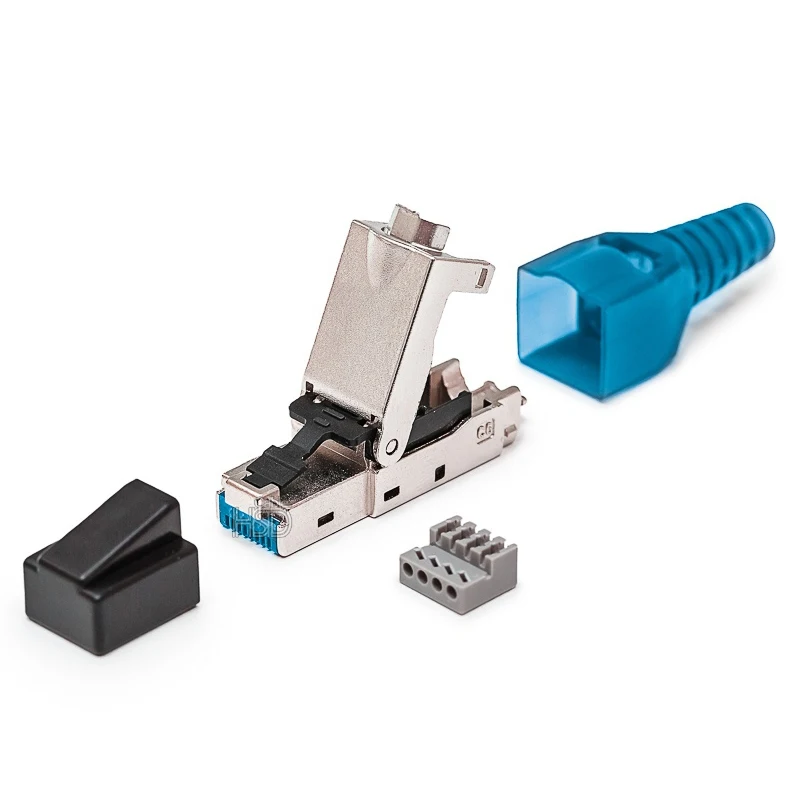
To ensure a continuous ground path from end to end, you must use components designed for shielded cabling:
- Shielded Connectors: Use shielded RJ45 connectors that have a metal housing. This housing makes contact with the cable’s braid screen and drain wire during termination.
- Shielded Keystone Jacks & Patch Panels: The shielded connector must plug into a shielded keystone jack or a shielded patch panel. These components are designed to transfer the ground from the connector’s housing to the device’s chassis.
- Grounded Equipment: The patch panel or network switch must itself be properly grounded to your building’s electrical ground. This final connection completes the path, allowing all the collected EMI to be safely dissipated.
A common best practice is to ground the shield at only one end (typically the patch panel or switch end) to prevent potential ground loops, which can also introduce noise.
Cat7 vs. Cat6a: Which is Truly Better for Resisting Interference?
When discussing high-performance, shielded cabling, the conversation inevitably includes both Cat7 and Cat6a. While you asked about Cat7, it’s crucial to understand its primary alternative to make an informed decision.
Comparing Shielding Technologies: S/FTP vs. F/UTP
As discussed, Cat7 primarily uses S/FTP (Screened/Foiled Twisted Pair) shielding. Shielded Cat6a, on the other hand, most commonly uses F/UTP (Foiled/Unshielded Twisted Pair). This means it has a single overall foil shield that wraps around all four unshielded pairs. While Cat7’s S/FTP design is technically superior on paper due to its dual-shielding, a well-constructed F/UTP Cat6a cable provides more than enough EMI protection for the vast majority of residential and commercial installations, including those running near power lines.
The Standardization Factor: Why Professionals Often Choose Cat6a
This is a critical point of distinction. Cat6a is an official standard recognized by the TIA/EIA, the primary standards body for communications cabling in North America. Cat7 is not. It is an ISO/IEC standard, more common in Europe. This has practical implications:
- Interoperability: TIA-rated Cat6a components (cables, jacks, connectors) are certified to work together. With Cat7, the market is filled with proprietary connectors (like GG45 or TERA) alongside non-standardized RJ45 terminations, leading to potential compatibility and performance issues.
- Cost and Availability: Because of its TIA standardization, Cat6a components are more widely available and generally more affordable than their Cat7 counterparts.
- Performance: Both Cat6a and Cat7 support 10 Gbps speeds. Cat7 is rated for a higher frequency (600 MHz vs. 500 MHz for Cat6a), but this provides little practical benefit in a 10GBASE-T network.
For these reasons, many professional installers prefer a properly installed shielded Cat6a system for its combination of excellent EMI resistance, guaranteed performance, and standards compliance.
How to Test for and Identify Interference in Your Network
If you suspect EMI is impacting your network despite using shielded cable, you can look for specific symptoms and perform some basic tests.
Symptoms of EMI on Your Ethernet Connection
- Inconsistent Speeds: Your connection speed fluctuates wildly, dropping significantly at random intervals.
- High Latency/Ping Spikes: You experience sudden lag spikes in online gaming or video calls.
- Dropped Connections: The network connection drops and reconnects intermittently.
- Correlation with Electrical Load: The issues become noticeably worse when a high-power appliance on the same circuit (e.g., a microwave, vacuum cleaner, or laser printer) is turned on.
- High CRC Error Rates: Checking the interface statistics in your switch or router’s admin panel may reveal a high number of Cyclic Redundancy Check (CRC) errors, which are a direct indicator of corrupted data packets.
Using Network Testing Tools
For a DIY diagnosis, you can run a continuous ping test. Open a command prompt (or terminal on Mac/Linux) and type `ping -t 8.8.8.8` (or another reliable address). Let this run and watch for “Request timed out” messages or sudden, dramatic increases in the time=XXms value. If these coincide with an electrical event, EMI is a likely culprit. For a definitive diagnosis, a professional installer would use a high-end cable certifier (like a Fluke Networks device), which can measure noise levels and pinpoint the exact location of a fault or interference source along the cable’s length.
Frequently Asked Questions (FAQ)
Is it safe to run Cat7 in the same conduit as power?
No. Most electrical codes around the world explicitly forbid running low-voltage communication cables in the same conduit as high-voltage power lines for safety reasons. You must use separate conduits. If space is tight, using two separate metal conduits will provide the best possible protection.
Does the type of power cable (e.g., Romex) matter?
Yes. The amount of EMI generated is related to the voltage and current, not necessarily the brand. However, higher voltage cables (like 240V lines for an oven or dryer) and cables feeding high-current devices will produce a much stronger magnetic field than a standard 120V lighting circuit.
Can I just wrap my Cat6 cable in foil to make it shielded?
While creative, this is a bad idea. A proper shield requires 100% coverage and, most importantly, a connection to ground via a drain wire. Simply wrapping a cable in household aluminum foil will not create an effective shield and will not have a proper ground path, making it ineffective.
What happens if I don’t follow these rules?
If you run an unshielded cable directly parallel to a power line, or if you run a shielded Cat7 cable without grounding it, you are likely to experience the symptoms of EMI listed above: slow and unreliable network performance, especially when nearby electrical devices are in use. Your 10 Gbps cable might only deliver 100 Mbps performance, or it might work fine one minute and be unusable the next.
Final Verdict: Running Cat7 Near Power is Possible with a Plan
Running Cat7 cable next to power lines is not only possible but is a scenario its design anticipates. Its dual-layer S/FTP shielding offers outstanding protection against the EMI that cripples lesser cables. However, this protection is not automatic. Its effectiveness is entirely dependent on a proper installation.
By adhering to the three golden rules—maintaining separation, crossing at 90 degrees, and using conduit where necessary—and, most critically, ensuring the shield is properly terminated and grounded, you can confidently install a high-performance network that will remain stable and fast, even in the most electrically noisy environments. For new installations, also consider shielded Cat6a as a cost-effective, standards-compliant alternative that offers comparable real-world protection.