


As a leading manufacturer of network cabling solutions, we at Dlaycable often get questions about compatibility. One of the most common is: “Can I use a newer Cat6 cable in my existing Cat5 or Cat5e setup?” It’s a great question that touches on performance, cost, and future-proofing your network.
This comprehensive guide will give you the definitive answer, explain the science behind it, and help you make the best choice for your specific needs.
The Quick Answer: Is it Possible?
Yes, you can absolutely use a Cat6 cable in a network designed for Cat5 or Cat5e. The connectors (RJ45) are the same, and the technology is designed to be backward compatible. A Cat6 cable will function perfectly in a Cat5/Cat5e port.
However, there’s a critical caveat: your network will only perform at the level of its slowest component. Plugging a high-performance Cat6 cable into a Cat5e system won’t magically upgrade your entire network speed to Cat6 levels. It will work, but it will operate at Cat5e speeds.
Cat6 vs. Cat5e: A Quick Comparison
To understand the implications, let’s look at the technical differences. While they may look similar, their internal construction and capabilities are distinct.
| Specification | Cat5e (Category 5 Enhanced) | Cat6 (Category 6) |
|---|---|---|
| Max Speed | 1 Gbps (1,000 Mbps) | 10 Gbps up to 55 meters (180 feet) |
| Bandwidth | 100 MHz | 250 MHz |
| Crosstalk | Standard Performance | Significantly Reduced |
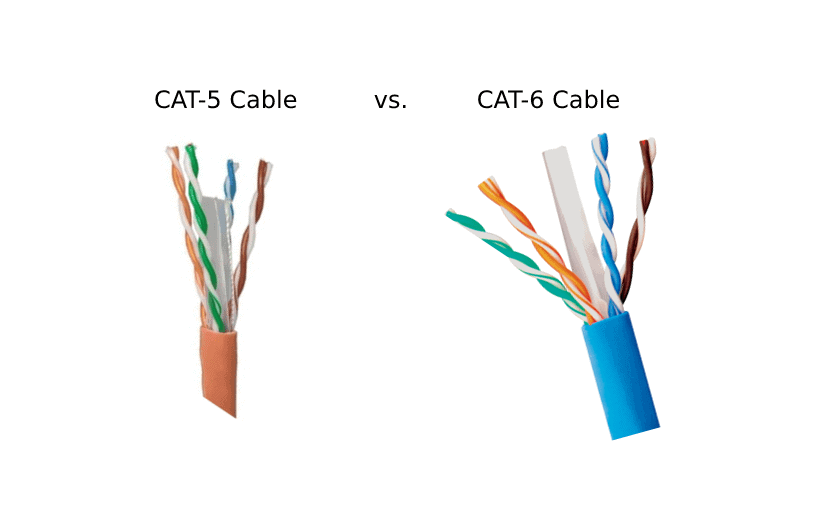
| Internal Structure | Less tightly twisted pairs | Tighter twisted pairs, often with a spline |
The Golden Rule: Understanding Backward Compatibility
Think of your network components like a chain. The strength of the chain is determined by its weakest link. In a network, this includes:
- Ethernet Cables (e.g., Cat5e, Cat6)
- Wall Jacks (Keystone Jacks)
- Patch Panels
- Routers and Switches
- The Network Interface Card (NIC) in your computer
If you connect a Cat6 cable between a laptop with a 1 Gbps NIC and a Cat5e wall jack, the connection will be limited to the maximum capability of the Cat5e standard, which is 1 Gbps. You get the reliability and reduced interference of Cat6, but not the 10 Gbps speed it’s capable of.
Inside the Cable: Why Cat6 Performs Better
As a manufacturer with over 15 years of experience producing high-quality cabling, we know the difference comes down to precision engineering. This is what you’re paying for in a superior cable.
- Tighter Wire Twists: Cat6 cables have more twists per inch in their copper wire pairs. This design is crucial for reducing “crosstalk”—the signal interference between adjacent wires. Less interference means a cleaner, more reliable signal.
- A Central Spline (Separator): Many of our certified Cat6 cables include a plastic spline that runs down the center, keeping the four twisted pairs separate. This physical barrier further isolates the pairs, drastically reducing crosstalk and allowing for higher bandwidth.
- Thicker Copper Conductors: Cat6 cables often use a slightly thicker gauge of copper wire (e.g., 23 AWG vs. 24 AWG in Cat5e). A thicker conductor provides less resistance, which improves signal strength, especially over longer distances.
These physical enhancements are why Cat6 can handle more data (250 MHz bandwidth) and protect against errors more effectively than Cat5e.
Practical Scenarios: When to Use Cat6 in a Cat5e Network
So, when does it make sense to use a Cat6 cable if the rest of your network is Cat5e?
Scenario 1: Replacing a Faulty Patch Cable
If you need to replace a single cable connecting your computer to the wall, using a Cat6 cable is an excellent choice. It’s a small investment that provides a more reliable connection with better interference protection, even if it’s running at 1 Gbps. It also prepares that link for future network upgrades.
Scenario 2: Future-Proofing New Installations
If you are running new cable through walls or ceilings, we strongly recommend using Cat6 or even Cat6a. The primary cost of a cabling job is the labor, not the cable itself. Installing a higher-specification cable now ensures your infrastructure can support future technologies like 10 Gbps internet, high-resolution streaming, and demanding smart home devices without needing to re-run wires later.
Scenario 3: Reducing Interference in “Noisy” Environments
Is your ethernet cable running near power lines, fluorescent lights, or major appliances? These can create electromagnetic interference (EMI). The superior shielding and tighter twists of a Cat6 cable make it far more resilient to this kind of “noise,” providing a more stable connection than a Cat5e cable would in the same environment.
The Dlaycable Recommendation: Making the Right Choice
At Dlaycable, our goal is to provide the perfect solution for the job. Based on our expertise in manufacturing and deploying network infrastructure, here is our professional advice:
- For new installations or significant upgrades: Always choose Cat6 or higher. The marginal increase in material cost is a small price to pay for a network infrastructure that will last for years and support next-generation speeds.
- For replacing individual patch cords: Using a Cat6 cable is a smart, low-cost upgrade. It offers better build quality and interference rejection.
- For budget-conscious projects with standard 1 Gbps needs: High-quality, certified Cat5e cable remains a perfectly viable and cost-effective option for standard home and office networking.
Ultimately, using a Cat6 cable in a Cat5e system is a forward-thinking move. You benefit from its robust construction immediately and ensure that part of your network is ready for the moment you decide to upgrade your router, switch, or internet service.
As an OEM/ODM provider, we create custom cabling solutions for projects of all sizes. Whether you need certified Cat5e for a large-scale deployment or premium Cat6a for a data center, quality and performance are built into every product we ship. Explore our range of ETL, CE, and RoHS certified network cables to find the reliable foundation your network deserves.