


For most homes and offices, Cat6 or Cat6a cables provide the best balance of performance and cost. Cat8 is designed for data centers, not residential use.
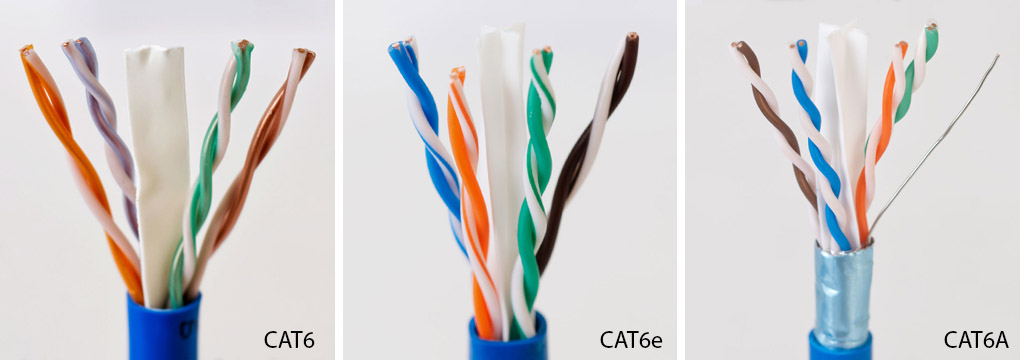
Table of Contents
- Understanding Ethernet Cable Categories
- A Detailed Look at Each Cable Type
- Key Factors When Choosing Your Cable
- Ethernet Cable Specifications at a Glance
- What Ethernet Cable Is Right for Your Needs?
- Why Cable Quality Is Just as Important
Understanding Ethernet Cable Categories
When you see “Cat” followed by a number on an Ethernet cable, “Cat” simply stands for Category. This system is used to classify cables based on their performance capabilities, specifically their data transfer speed and bandwidth. Think of speed (measured in gigabits per second, or Gbps) as how fast cars can travel on a highway, and bandwidth (measured in megahertz, or MHz) as how many lanes the highway has. A higher category number generally means a higher potential speed and more bandwidth, allowing more data to be transmitted simultaneously.
Another critical difference between categories is the level of shielding. Shielding is a protective layer within the cable, typically foil or a braid, designed to guard against electromagnetic interference (EMI). This interference, often called “crosstalk,” can be generated by nearby power cables, motors, or even other network cables. Better shielding results in a more stable and reliable signal, especially in electronically noisy environments or when running cables in tight bundles.
A Detailed Look at Each Cable Type
Choosing the right cable involves understanding the specific capabilities and intended applications of each category. Moving from Cat6 to Cat8 isn’t always an upgrade; it’s about selecting the appropriate tool for the job.
Cat6: The Reliable Standard for Today’s Networks
Category 6 is the workhorse of modern networking for a reason. It offers a significant performance jump from its predecessor (Cat5e) and provides more than enough capability for the vast majority of home and small office networks. It is designed to handle speeds of 1 Gbps over a distance of up to 100 meters (328 feet) and can even support 10 Gbps speeds over shorter distances, typically up to 55 meters (180 feet).
With a bandwidth of 250 MHz, Cat6 is perfectly suited for gigabit internet plans, streaming 4K video, online gaming, and general office tasks. Its affordability and widespread availability make it the go-to, cost-effective choice for new installations where extreme data speeds are not a primary requirement.
Cat6a: The Upgraded Choice for Future-Proofing
Category 6a (the ‘a’ stands for Augmented) is the logical next step up. Its primary advantage over Cat6 is its ability to maintain a full 10 Gbps connection over the entire 100-meter (328-foot) distance. It achieves this with a higher bandwidth of 500 MHz and improved construction, which almost always includes better shielding to combat crosstalk, especially at higher frequencies.
Cat6a is the ideal choice for users with multi-gig internet plans, businesses that transfer large files internally, or anyone looking to build a network that will remain relevant for years to come. It’s also an excellent option for high-performance applications like Power over Ethernet (PoE) devices that require stable power and data delivery. While slightly more expensive and rigid than Cat6, its performance guarantees make it a wise investment. For a robust and future-ready network, DLAY CABLE’s Cat6a cables feature superior shielding to ensure rock-solid 10 Gbps performance.
Cat7: The Highly-Shielded Specialist
Category 7 presents a unique case. It boasts a bandwidth of 600 MHz and also supports 10 Gbps up to 100 meters. What sets it apart is its construction; every Cat7 cable is fully shielded (S/FTP), with shielding around each individual pair of wires as well as an overall braid shield. This provides exceptional protection against EMI.
However, Cat7 has a significant caveat: it is an ISO standard, not a TIA/EIA standard, which is the dominant standard in North America. For this reason, it’s not widely adopted in enterprise environments. It also was originally designed for a non-RJ45 connector (GG45) to reach its full potential, though it is used with standard RJ45 connectors. For most practical purposes, Cat6a offers the same 10 Gbps performance over the same distance and is a recognized TIA standard, making it a more common and often more practical choice.
Cat8: The Data Center Powerhouse
Category 8 is in a league of its own. It is an entirely different class of cable designed for a specific environment: the data center. It supports staggering speeds of 25 Gbps or even 40 Gbps, with a massive bandwidth of 2000 MHz. This incredible performance comes with a major trade-off: its maximum channel length is restricted to just 30 meters (98 feet).
This short distance makes it ideal for connecting servers, switches, and storage area networks within a single room or rack. Cat8 cables are always shielded, making them very thick and rigid, and they are significantly more expensive. For any residential or standard office setting, Cat8 is complete overkill. Your home or office equipment cannot utilize its speed, making it an unnecessary expense.
Key Factors When Choosing Your Cable
Beyond the technical specifications, your decision should be guided by your specific environment and requirements.
Your Internet and Network Hardware Speed
Your network is only as fast as its slowest component. Buying a 40 Gbps Cat8 cable will not make your 1 Gbps internet plan any faster. Your Ethernet cable choice should align with your Internet Service Provider (ISP) plan and the capabilities of your router, switches, and computers. If all your devices have 1 Gbps Ethernet ports, a Cat6 cable is perfectly sufficient.
The Installation Environment and Interference
Consider where the cable will be run. Is it going through walls alongside electrical wiring? Will it be bundled with dozens of other network cables in an office? In these high-EMI environments, a shielded cable (like Cat6a or Cat7) is crucial for maintaining signal integrity and preventing data loss. For a simple connection from a router to a nearby computer in an open room, an unshielded (UTP) Cat6 cable is often adequate.
Future-Proofing Versus Practicality
It can be tempting to buy the “best” cable available to prepare for future technology. However, there’s a balance between foresight and practicality. For home and office users, Cat6a strikes this balance perfectly. It supports the 10 Gbps speeds that are slowly becoming more common without the extreme cost and limitations of Cat8. For most, Cat6a is the highest category worth considering for future-proofing.
Ethernet Cable Specifications at a Glance
This table provides a clear comparison of the most important specifications for each category.
| Feature | Cat6 | Cat6a | Cat7 | Cat8 |
|---|---|---|---|---|
| Max Speed | 1 Gbps (10 Gbps at <55m) | 10 Gbps | 10 Gbps | 25/40 Gbps |
| Max Bandwidth | 250 MHz | 500 MHz | 600 MHz | 2000 MHz |
| Max Distance | 100 meters (328 ft) | 100 meters (328 ft) | 100 meters (328 ft) | 30 meters (98 ft) |
| Shielding | UTP or Shielded | Usually Shielded | Always Shielded (S/FTP) | Always Shielded (S/FTP) |
| Ideal Use Case | Home & Small Office | Future-Proof Homes & Offices | Specialty Industrial/AV | Data Centers |
What Ethernet Cable Is Right for Your Needs?
Let’s break down the recommendations based on common user profiles.
For Everyday Home Use and Streaming
Recommendation: Cat6
For most households, a Cat6 cable is the perfect solution. It easily handles internet speeds up to 1 Gbps, which covers the majority of residential plans. It provides a stable, low-latency connection for 4K video streaming, video conferencing, and general web browsing without the extra cost of higher-category cables.
For Competitive Gamers and Content Creators
Recommendation: Cat6a
For this group, network stability and speed are paramount. Cat6a is the clear winner. Its support for 10 Gbps over long distances ensures you can take full advantage of multi-gig internet plans. More importantly, its superior shielding minimizes latency and packet loss, which are critical for competitive online gaming and for smoothly transferring large video files to a network-attached storage (NAS) device.
For Modern Offices and Power over Ethernet (PoE)
Recommendation: Cat6a
Businesses should invest in a network backbone that can support growth. Cat6a provides the 10 Gbps speed needed for a demanding office environment with many users. Its enhanced performance and shielding also make it better for PoE applications like VoIP phones, security cameras, and wireless access points, where it delivers both data and power reliably.
For Data Centers and Server Rooms
Recommendation: Cat8
This is the exclusive domain of Cat8. Its 25/40 Gbps speed is necessary for top-of-rack or end-of-row network topologies that connect high-speed switches and servers. In this professional environment, the 30-meter distance limitation is not a drawback but a design parameter. For mission-critical infrastructure, trust DLAY CABLE’s professional-grade Cat8 cables to deliver maximum throughput.
Why Cable Quality Is Just as Important
Choosing the right category is only half the battle. The actual construction quality of the cable can dramatically impact its performance. Look for cables with 100% pure bare copper conductors, not copper-clad aluminum (CCA). Pure copper offers superior conductivity and durability, ensuring you get the speeds you paid for. The cable’s jacket rating (e.g., CM for general use, CMR for riser applications) and the quality of the RJ45 connector tabs also contribute to a reliable, long-lasting connection.
Ultimately, selecting the correct Ethernet cable means matching the cable’s capabilities to your network’s hardware and your specific application. By understanding the differences between the categories, you can make an informed choice that provides the perfect blend of performance, reliability, and value for your network.