


As experts in network infrastructure at D-Lay Cable, we frequently get questions about cable compatibility. One of the most common is: “Can I plug a Cat6 cable into a Cat5 network, or vice versa?” It’s a critical question whether you’re upgrading a home office, managing a corporate network, or planning a new installation.
The short answer is yes, they are physically compatible. But the full story is about performance, not just connection. Understanding the nuances will help you build a reliable, high-speed network that meets your needs today and in the future. dlaycable will break down everything you need to know.
Article Contents:
The Quick Answer: Compatibility vs. Performance
Cat6 and Cat5 (specifically, its modern successor, Cat5e) cables both use the same RJ45 connector. This means you can physically plug a Cat6 cable into a device, wall jack, or patch panel designed for Cat5e, and it will work. Likewise, a Cat5e cable will plug into a Cat6 port.
However, your network performance will always be limited by its “weakest link.”
Imagine your network is a highway. Cat5e is a highway with a speed limit of 100 mph (representing 1 Gigabit per second). Cat6 is a newer, wider highway with a speed limit of 250 mph (representing up to 10 Gigabits per second). If you drive a sports car (your data) on the 100 mph highway, you can only go 100 mph. If you connect a short stretch of the 250 mph highway to it, you’re still stuck at 100 mph for the overall journey.
In networking terms: If any part of your network channel—the cable, the keystone jacks, the patch panel, or the device port—is Cat5e, your entire connection will perform at Cat5e standards, even if other parts are Cat6.
Key Differences: Cat6 vs. Cat5e Explained
While they look similar, the internal construction of Cat6 and Cat5e cables is what dictates their performance capabilities. At D-Lay Cable, we build our products to exceed industry standards, ensuring you get the performance you pay for.
Speed and Bandwidth
- Cat5e (Category 5e): Supports data speeds up to 1 Gigabit per second (Gbps) at a bandwidth of 100 MHz. This is perfectly adequate for most home internet plans, streaming, and general office work.
- Cat6 (Category 6): Supports speeds up to 10 Gbps over shorter distances (up to 55 meters) and 1 Gbps over longer distances (up to 100 meters). It operates at a much higher bandwidth of 250 MHz.
The higher bandwidth of Cat6 means more data can travel simultaneously, reducing congestion and improving performance for demanding applications.
Physical Construction and Crosstalk
The primary reason for Cat6’s superior performance is its robust construction, designed to combat interference known as “crosstalk.”
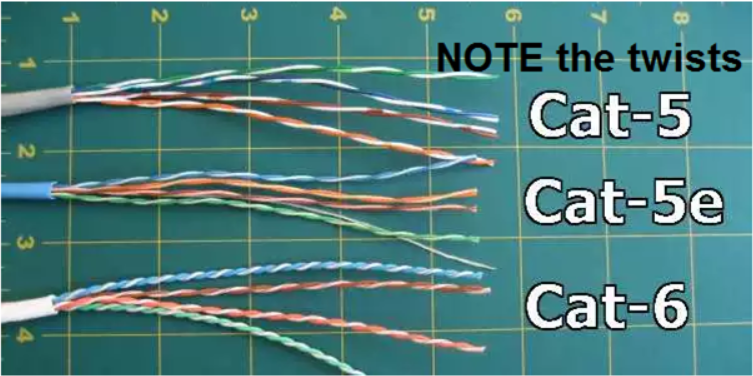
- Tighter Twists: Cat6 cables have more twists per inch in their copper wire pairs. This design helps cancel out electromagnetic interference from adjacent pairs.
- Spline (Separator): Most Cat6 cables include a plastic separator, or spline, that runs down the center of the cable, isolating each of the four wire pairs. This drastically reduces crosstalk and allows for higher speeds.
- Thicker Conductors: Often, Cat6 cables use a slightly thicker gauge of copper wire, which improves signal strength over distance.
This meticulous engineering is why choosing a high-quality cable from a trusted supplier like D-Lay Cable is crucial. Poorly constructed cables, especially those using Copper Clad Aluminum (CCA) instead of 100% pure copper, will fail to deliver their rated performance.
Quick Comparison Table
| Feature | Cat5e | Cat6 |
|---|---|---|
| Max Speed | 1 Gbps (at 100 meters) | 10 Gbps (up to 55 meters) |
| Bandwidth | 100 MHz | 250 MHz |
| Internal Separator (Spline) | No | Yes (Typically) |
| Best For | Home and small office networks, 1 Gbps connections | New installations, future-proofing, high-demand applications, reducing interference |
Real-World Scenarios: Mixing and Matching Cables
Let’s look at how this plays out in common situations.
Scenario 1: Using a Cat6 Patch Cable on a Cat5e Network
This is the most frequent use case. You have an existing network with Cat5e cabling in the walls and Cat5e jacks, but you need a new patch cable to connect your computer or gaming console.
Result: This is perfectly fine. The Cat6 cable is backward compatible. However, your connection speed will be limited to 1 Gbps by the Cat5e infrastructure. You gain a slight advantage from the better construction of the Cat6 patch cord, which can reduce near-end crosstalk, but you will not get 10 Gbps speeds.
Scenario 2: Using a Cat5e Patch Cable on a Cat6 Network
Here, you’ve invested in a full Cat6 infrastructure (in-wall cables, jacks, patch panel) capable of 10 Gbps, but you use an old Cat5e cable to connect your device.
Result: You’ve just created a bottleneck. The entire channel is now downgraded to Cat5e standards (1 Gbps speed, 100 MHz bandwidth). To get the performance you paid for with your Cat6 network, you must use Cat6 patch cables and components throughout.
When Should You Upgrade Your Entire Network to Cat6?
Deciding whether to stick with Cat5e or invest in a full Cat6 upgrade depends on your specific needs.
Stick with Your Cat5e Network If:
- Your internet speed is 1 Gbps or less.
- Your primary activities are web browsing, email, and HD video streaming.
- You are not planning any major renovations and the existing cabling is in good condition.
Upgrade to a Full Cat6 Network If:
- You are doing a new installation. The cost difference between Cat5e and Cat6 is minimal for new builds, and Cat6 provides significant future-proofing.
- You need 10 Gbps speeds. This is relevant for video editing, large file transfers between local devices, or running powerful servers.
- You work in an environment with high electromagnetic interference (EMI). The superior shielding and construction of Cat6 make it more resilient in electronically “noisy” areas.
- You want to maximize performance and reliability for the long term. A professionally installed Cat6 network is a robust asset for any modern home or business.
The D-Lay Cable Standard: Why Quality Matters Most
Whether you choose Cat5e or Cat6, the single most important factor is the quality of the components. A cheap, uncertified Cat6 cable will perform worse than a high-quality, certified Cat5e cable.
At D-Lay Cable, we are committed to providing professional-grade products that you can trust. Our advantages include:
- 100% Pure Bare Copper Conductors: We never use inferior Copper Clad Aluminum (CCA). Pure copper ensures maximum signal integrity, safety, and compliance with industry standards.
- Precision Engineering: Our cables are manufactured with tight, consistent twists and durable splines (in Cat6) to guarantee performance and eliminate crosstalk.
- A Complete Ecosystem: From bulk cable and patch cords to keystone jacks, panels, and tools, we provide everything you need to build a high-performance network channel from end to end.
Conclusion: Make the Smart Choice
So, does Cat6 work with Cat5? Yes, but with the critical caveat that your network’s performance is dictated by its lowest-spec component. For simple patch cable replacements on a 1 Gbps network, a quality Cat6 cord is a fine, slightly more robust choice.
For any new installation or performance-critical application, installing a complete, end-to-end Cat6 system with high-quality components is the definitive best practice. It provides the speed, reliability, and future-readiness that modern digital life demands.
Have more questions or need help selecting the right cables for your project? Explore our full range of professional-grade Cat5e and Cat6 cabling solutions, or contact the experts at D-Lay Cable today!