


In today’s connected world, the humble Ethernet cable is the unsung hero of a stable and fast network. Whether you’re setting up a home office, a gaming rig, or a complex business network, using the right cable is critical. You might have a drawer full of tangled cables, but how do you identify the specific one you need? A Category 5e (Cat5e) cable is a common and reliable choice for speeds up to 1 Gigabit per second (Gbps), but telling it apart from an older Cat5 or a newer Cat6 can be tricky if you don’t know what to look for.
As a leading manufacturer of high-quality network cabling, we at D-Lay Cable want to empower you with the knowledge to identify your cables correctly. dlaycable will walk you through the definitive methods and subtle clues to determine if you have a Cat5e cable in your hands.
In This Article:
The Definitive Method: Read the Cable Jacket
The most reliable and straightforward way to identify an Ethernet cable’s category is to read the text printed on its outer sheath, or “jacket.” Manufacturers are required by industry standards (like TIA/EIA) to print identifying information along the length of the cable.
What to Look For
Scan the cable’s surface for a repeating line of text. You are looking for specific keywords that explicitly state the category. For a Cat5e cable, you will see one of the following variations:
- CATEGORY 5E
- CAT.5E
- ENHANCED CATEGORY 5
Here is an example of what a full text string might look like on a D-Lay Cable product:
D-LAY CABLE E123456 (UL) C(UL) CM 4PR 24AWG UTP TIA/EIA-568-C.2 CATEGORY 5E -- TESTED TO 350MHZ
Understanding the Other Markings
While you’re looking, you’ll see other useful information:
- AWG (American Wire Gauge): This indicates the thickness of the copper conductors inside. 24AWG is most common for Cat5e.
- UTP/STP/FTP: This describes the shielding. UTP (Unshielded Twisted Pair) is standard for Cat5e. STP (Shielded Twisted Pair) or FTP (Foiled Twisted Pair) means the cable has extra protection against electromagnetic interference (EMI).
- Certifications: Marks like (UL) or ETL indicate the cable has been tested for safety and quality by independent labs.
Pro Tip: If the text is worn or hard to read, try using a magnifying glass or the zoom function on your phone’s camera under good light.
Secondary Clues: A Close Physical Inspection
If the text on the jacket is completely illegible or the cable is unmarked (a red flag for low-quality products), there are a few physical clues. Note: These are not definitive and should be considered educated guesses.
Examine the RJ45 Connector
The plastic plug at the end of the cable can sometimes offer hints. Cat5 and Cat5e connectors are generally simple, with the eight pins aligned in a flat row. Some (but not all) Cat6 connectors have staggered pins or an internal “spline” (a plastic divider) that is visible through the clear plastic. However, since many Cat6 cables use standard connectors, this is not a reliable method.
Cable Thickness and Flexibility
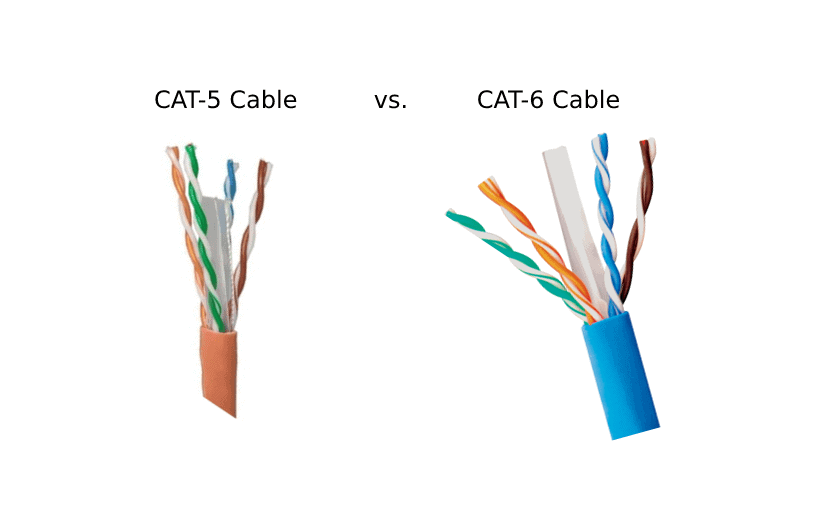
Generally, higher-category cables are thicker and less flexible. This is because Cat6 and Cat6a cables have thicker copper conductors, tighter twists, and often include a plastic spline to separate the pairs. A Cat5e cable is typically thinner and more pliable than a Cat6 cable, but it can be nearly indistinguishable from an older Cat5 cable based on feel alone.
The Final Check: Verifying Performance
If all else fails, a performance test can give you a strong indication. Cat5e was designed to reliably support Gigabit Ethernet (1 Gbps or 1000 Mbps). An older Cat5 cable is only rated for 100 Mbps.
To test this:
- Connect a computer with a Gigabit network port directly to a router or switch that also has Gigabit ports using the mystery cable.
- On Windows, go to Control Panel > Network and Internet > Network and Sharing Center, and click on your Ethernet connection. The status window will show the “Speed.”
- On macOS, go to System Settings > Network, select your Ethernet connection, and check the “Speed” listed.
If the connection speed is 1.0 Gbps, you likely have a Cat5e cable or better. If it’s only 100 Mbps, it’s probably a Cat5 cable or there’s a problem with one of the devices or the cable itself.
A Common Misconception: Debunking the Wire Color Myth
A frequent point of confusion is the color of the eight small wires inside the cable. You will see a standard combination of four solid colors (blue, orange, green, brown) and four striped wires (white/blue, white/orange, white/green, white/brown).
Crucially, the color pattern of these wires (known as T568A or T568B wiring standards) does NOT determine the cable’s category.
Both a Cat5 and a Cat6 cable use the exact same color-coding. This standard simply ensures the pins on one end of the cable correctly correspond to the pins on the other. It has no bearing on the cable’s performance capabilities, which are determined by the quality of the copper, the tightness of the twists, and the level of shielding.
Why It Matters: Cat5e vs. Other Categories
Using the wrong cable can bottleneck your entire network. Here’s a quick comparison to see why identifying your Cat5e is important:
| Category | Max Speed | Max Bandwidth | Best For |
|---|---|---|---|
| Cat5 | 100 Mbps | 100 MHz | Legacy devices, slow internet connections. Not recommended for modern networks. |
| Cat5e | 1 Gbps | 100 MHz | Standard home and office use, HD streaming, online gaming. |
| Cat6 | 10 Gbps (up to 55m) | 250 MHz | Future-proofing, high-demand networks, and reducing crosstalk in dense environments. |
The D-Lay Cable Promise: Clarity and Quality
The uncertainty of using an unmarked or misidentified cable can lead to network instability, slow speeds, and frustrating troubleshooting. That’s why at D-Lay Cable, we believe in absolute transparency and uncompromising quality.
Every Ethernet cable we manufacture, from our reliable Cat5e to our high-performance Cat8, is:
- Clearly Marked: Our cable jackets feature clear, easy-to-read text with all the necessary information, including the category, gauge, and safety certifications.
- Rigorously Tested: We use industry-leading Fluke testers to ensure every cable meets or exceeds TIA performance standards for its category. You get the speed you pay for.
- Certified for Safety: With UL, ETL, CE, and RoHS certifications, you can be confident that our products are safe, reliable, and built to last.
Don’t let a mystery cable compromise your connection. When you need certainty, choose a cable from a trusted manufacturer. If you’re ever in doubt, the best solution is to invest in a new, properly labeled cable. Your network will thank you for it.