


In today’s connected world, the speed and reliability of your internet connection are paramount. While we often blame our internet service provider (ISP) for slow speeds, the culprit can sometimes be hiding in plain sight: your Ethernet cable. Older cables, particularly Category 5 (Cat5), can act as a bottleneck for modern high-speed networks. As a leading manufacturer of high-quality network cabling, we at DlayCable want to empower you with the knowledge to identify your cables and ensure your network is performing at its peak.
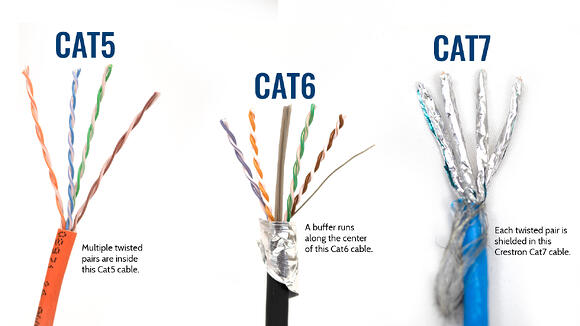
So, how can you tell if that old cable you found in a drawer is a Cat5 or something more capable? It’s easier than you think. Here’s our definitive guide.
Article Contents:
The Easiest Method: Read the Text on the Cable Jacket
The most reliable and straightforward way to identify an Ethernet cable is to examine the text printed along its outer plastic sheath, also known as the jacket. Manufacturers are required to print identifying information directly onto the cable. You may need good lighting or a magnifying glass, but the information is almost always there.
Look for text that says one of the following:
- CAT5 or CATEGORY 5
- CAT5e, CAT.5e, or CATEGORY 5e (This is an ‘Enhanced’ version, which is much more common and capable than standard Cat5).
- CAT6, CAT.6, or CATEGORY 6
If the text explicitly says “CAT5” or “CATEGORY 5” without the “e,” you have a standard Cat5 cable. These cables are limited to speeds of 100 Mbps, which is insufficient for Gigabit internet plans and modern networking demands.
If you see “CAT5e,” you have a Category 5e cable. This is a significant improvement, supporting speeds up to 1,000 Mbps (1 Gigabit). For most home and office use today, Cat5e is the minimum standard you should be using.
What If the Text is Unreadable? Other Clues to Look For
Sometimes, the text on the cable jacket can be worn down, smudged, or simply too small to read. In these cases, you can use a few secondary methods to make an educated guess, although they are not as definitive.
1. Test Your Network Speed
This is an indirect but helpful test. Connect the mystery cable directly from your modem or router to a computer with a Gigabit Ethernet port. Run a network speed test using a reliable online service.
- If your speed maxes out around 90-95 Mbps, despite having a faster internet plan, there’s a very high probability you’re using a Cat5 cable (or there’s another issue in your network). Cat5’s maximum supported speed is 100 Mbps.
- If your speed is significantly higher than 100 Mbps (e.g., 300 Mbps, 500 Mbps, or over 900 Mbps), the cable is at least Cat5e or better.
Note: This test is only conclusive if you are certain that your internet plan, modem, router, and computer are all capable of speeds greater than 100 Mbps.
2. Check the Original Packaging or Receipt
If you happen to still have the packaging the cable came in, or the receipt from its purchase, the category will be clearly listed there. This is often overlooked but can be a simple solution.
Why It Matters: Cat5 vs. Cat5e vs. Cat6
Understanding the difference between categories is crucial. It’s not just about numbers; it’s about performance, bandwidth, and preventing crosstalk (interference).
| Category | Max Speed | Max Bandwidth | Best For |
|---|---|---|---|
| Cat5 | 100 Mbps | 100 MHz | Legacy devices and networks with speeds under 100 Mbps. (Considered obsolete) |
| Cat5e | 1 Gbps (1,000 Mbps) | 100 MHz | Standard home and office use, Gigabit internet, HD streaming. |
| Cat6 | 10 Gbps (up to 55m) | 250 MHz | Future-proofing, high-demand networks, data centers, and reducing interference in crowded environments. |
As you can see, the leap from Cat5 to Cat5e is substantial. Using a Cat5 cable on a Gigabit network is like forcing a sports car to drive on a single-lane dirt road—you’ll never reach its full potential.
You’ve Identified a Cat5 Cable – Should You Upgrade?
The short answer: Yes, in almost all cases.
If your diagnostic work confirms you are using a standard Cat5 cable, upgrading is one of the most cost-effective ways to improve your network’s performance. Here’s when an upgrade is essential:
- If your internet plan is faster than 100 Mbps: You are paying for speed you cannot use. Upgrading to at least Cat5e will unlock the full performance of your internet plan.
- For 4K streaming, online gaming, or large file transfers: These activities require stable, high-speed connections. A Cat5 cable will be a significant bottleneck, leading to buffering, lag, and slow downloads.
- When setting up a new network or office: Don’t start with outdated technology. Using Cat6 or higher provides a solid foundation that will support your needs for years to come (future-proofing).
The DlayCable Bottom Line: The Right Cable for the Right Job
Your network is only as strong as its weakest link. Identifying and replacing outdated Cat5 cables is a simple step with a massive impact on your daily digital life. By reading the jacket text, you can quickly determine what you’re working with. If in doubt, upgrading to a certified Cat5e or Cat6 cable is a small investment that pays huge dividends in speed and reliability.
At DlayCable, we specialize in manufacturing cables that meet and exceed industry standards, ensuring every connection is robust, reliable, and ready for the future. A quality infrastructure begins with quality components—start with your cables.