


Is your video call choppy? Does your online game lag at the worst possible moment? Before you blame your internet service provider, the culprit might be closer than you think. The humble Ethernet cable connecting your device to the network is the physical highway for your data. Using an outdated or low-quality cable is like forcing high-speed traffic down a narrow, bumpy country lane—it creates a bottleneck that slows everything down.
At Dlaycable, we don’t just manufacture cables; we build the backbones of reliable digital experiences. We understand that knowing your hardware is the first step to optimizing your network’s performance. dlaycable will empower you to identify your current Ethernet cable and understand the crucial differences between Cat5, Cat5e, and Cat6, ensuring you have the right connection for your needs.
Why Your Ethernet Cable Category Matters
Not all Ethernet cables are created equal. The “Category” (or “Cat”) number refers to the specification standard the cable is built to meet. Each successive category represents a significant leap in performance, primarily in two key areas:
- Speed (Mbps/Gbps): This is the maximum data transfer rate the cable can support. A higher number means faster downloads, smoother streaming, and quicker file transfers.
- Bandwidth (MHz): This is the frequency range the cable can handle. Higher bandwidth allows more data to be transmitted simultaneously, reducing congestion and improving overall network stability, especially when multiple devices are active.
Choosing the wrong category means you could be paying for high-speed internet but never actually experiencing it.
The Easiest Way to Identify Your Cable: Check the Jacket
The most reliable and straightforward method for identifying your Ethernet cable is to simply look at it. Reputable manufacturers like us print identifying text directly onto the cable’s outer sheath, or “jacket.”
Run your fingers along the length of the cable and look for a series of stamped or printed text. You’re looking for a key phrase that will include “CATEGORY,” “CAT,” or “TIA/EIA.”
- If you see CAT5 or CATEGORY 5, you have a legacy Cat5 cable.
- If you see CAT5e, CATEGORY 5e, or ENHANCED CATEGORY 5, you have the more common Cat5e cable.
- If you see CAT6 or CATEGORY 6, you have a high-performance Cat6 cable.
The text will often include other information, such as the wire gauge (e.g., 24AWG), shielding type (e.g., UTP for Unshielded Twisted Pair), and safety ratings (e.g., CM, CMR).
Physical and Performance Clues (If the Text is Unreadable)
Sometimes the text on the cable jacket can be worn, smudged, or completely unreadable. In these cases, you can use a combination of performance and physical clues to make an educated guess.
Performance Limitations
If you have a gigabit internet plan (1,000 Mbps or higher) but your wired connection speed test consistently caps out around 100 Mbps, there’s a very high probability you are using an old Cat5 cable. Both Cat5e and Cat6 can handle gigabit speeds, but Cat5 cannot.
Physical Differences
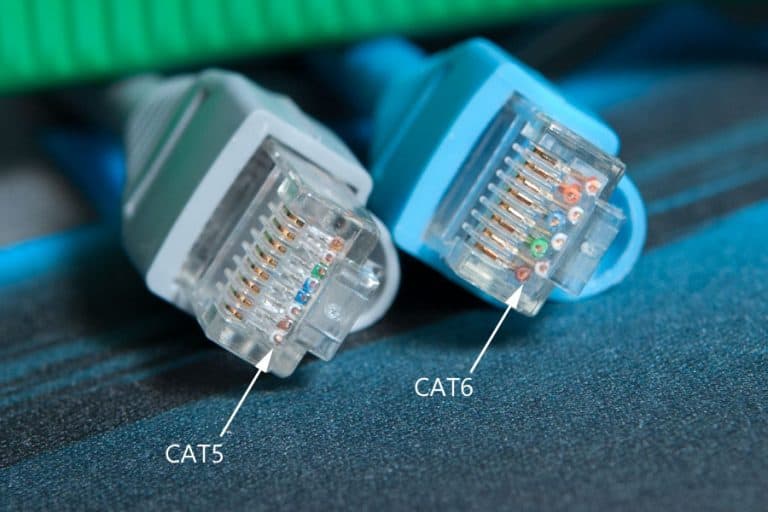
While not a foolproof method, Cat6 cables are often noticeably thicker and less flexible than their Cat5e counterparts. This is because they typically contain thicker copper wires and, more importantly, a plastic separator called a “spline” that runs down the center of the cable. This spline isolates the four twisted pairs of wires, reducing crosstalk and allowing for higher performance. Cat5e cables do not have a spline.
Cat5 vs. Cat5e vs. Cat6: A Quick Comparison Chart
To make it even clearer, here is a direct comparison of the three most common Ethernet cable categories found in homes and offices today.
| Feature | Cat5 | Cat5e (Enhanced) | Cat6 |
|---|---|---|---|
| Max Speed | 100 Mbps | 1,000 Mbps (1 Gbps) | 10 Gbps (up to 55m) |
| Bandwidth | 100 MHz | 100 MHz | 250 MHz |
| Common Use Case | Legacy, Obsolete (Replace) | Home & Small Office Networks | Gaming, 4K Streaming, Future-Proofing |
| Internal Spline | No | No | Yes (Typically) |
A Deeper Dive into Each Category
Category 5 (Cat5): The Legacy Cable
Once the standard, Cat5 is now considered obsolete. It is only capable of speeds up to 100 Mbps, which is a severe bottleneck for nearly all modern internet plans. If you identify a Cat5 cable in your network, we strongly recommend replacing it immediately to see a significant performance improvement.
Category 5e (Cat5e): The Modern Baseline
Cat5e (“e” for enhanced) was a major improvement, designed to reliably support Gigabit Ethernet (1 Gbps) over the same 100 MHz bandwidth as Cat5. It achieves this with stricter manufacturing standards that reduce crosstalk. For most standard home internet use, like HD streaming, web browsing, and remote work, Cat5e is perfectly adequate.
Category 6 (Cat6): The Performance Upgrade
Cat6 represents the next step up in performance. With a bandwidth of 250 MHz and the ability to handle speeds up to 10 Gbps (though at shorter distances of up to 55 meters), Cat6 is built for data-intensive applications. The inclusion of a spline and more tightly twisted wires makes it more robust against interference. This is the ideal choice for serious gamers, 4K/8K video streamers, and anyone looking to future-proof their home or office network.
Which Ethernet Cable Should You Choose?
- For Basic Home Use: If your internet plan is under 1 Gbps and you mainly browse the web, check email, and stream in HD, a high-quality Cat5e cable is a reliable and cost-effective choice.
- For Gamers, Streamers, and Power Users: If you have a gigabit-plus internet plan, engage in competitive online gaming, stream in 4K, or transfer large files frequently, a Cat6 cable is a worthwhile investment. Its higher bandwidth provides more headroom and stability for demanding tasks.
- For New Installations & Future-Proofing: If you are wiring a new office or home, always opt for Cat6 or even Cat6a. The minimal extra cost upfront will save you from having to upgrade later as data demands inevitably increase.
Beyond the Category: Why Quality Construction is Crucial
Identifying the category is only half the battle. The quality of the cable’s construction plays a massive role in its performance and longevity. As a dedicated manufacturer, we know what separates a great cable from a poor one.
- Pure Copper vs. CCA: Always choose cables with 100% pure bare copper conductors. Cheaper alternatives use Copper Clad Aluminum (CCA), which has higher resistance, breaks easily, and can be a fire hazard. Dlaycable exclusively uses pure copper for maximum signal integrity and safety.
- Shielding (UTP vs. STP): Most home cables are UTP (Unshielded Twisted Pair). In environments with high electromagnetic interference (EMI), such as industrial settings or near large power sources, STP (Shielded Twisted Pair) cables provide an extra layer of protection.
- Certifications: Look for cables that meet safety and quality standards like UL, CE, and RoHS. These certifications ensure the cable has been rigorously tested for reliability and is free from hazardous materials.
Conclusion: Connect with Confidence
Understanding your Ethernet cable is a simple yet powerful way to take control of your network’s performance. By checking the jacket print, observing physical characteristics, and comparing against a clear standard, you can easily identify what you’re working with. Upgrading from an old Cat5 cable to a well-constructed Cat5e or Cat6 cable can unlock the full speed you’re paying for.
When it’s time to upgrade or install a new connection, don’t settle for less. Choose a cable from a trusted manufacturer that prioritizes quality materials and stringent standards. Explore our range of high-performance network cabling solutions or contact our team to find the perfect, reliable connection for your needs. Connect with Dlaycable, and connect with confidence.