


Yes, a Cat8 Ethernet cable is backward compatible with a Cat6 network. This is because both Cat8 and Cat6 cables use the same RJ45 connector, meaning a Cat8 cable will physically plug into any standard Cat6-rated port on a computer, switch, or wall plate. However, while they are physically compatible, using a Cat8 cable in an environment built entirely for Cat6 will not increase your network speed or performance. Your network’s overall performance will be limited to the capabilities of the Cat6 standard, effectively making the Cat8 cable perform like a high-quality, but over-specified, Cat6 cable.
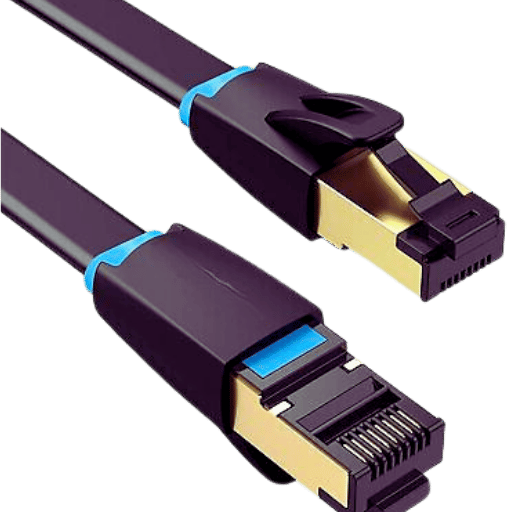
Table of Contents
- 1. What is the Fundamental Difference Between Cat6 and Cat8 Cabling?
- 2. The Core of Compatibility: Physical vs. Performance
- 3. When Should You Use a Cat8 Cable in a Cat6 Network?
- 4. What About the Other Way Around? Can You Use Cat6 in a Cat8 Network?
- 5. Choosing the Right Cable for Your Needs: A D-Lay Cable Recommendation
- 6. Frequently Asked Questions (FAQ)
- 7. Conclusion: Making the Smart, Cost-Effective Choice
What is the Fundamental Difference Between Cat6 and Cat8 Cabling?
Understanding the compatibility question requires knowing what sets these two cable categories apart. While they may look similar, their internal construction and performance capabilities are worlds apart. Category 6 (Cat6) is the workhorse of modern office and home networks, designed for reliability and solid performance. Category 8 (Cat8) is a specialized, high-tech solution built for the extreme speed demands of data centers.
The primary distinctions lie in bandwidth, transmission speed, and intended application. Cat6 supports a bandwidth of 250 MHz, enabling data rates of 1 Gbps up to 100 meters and even 10 Gbps at shorter distances (up to 55 meters). Cat8, on the other hand, is a powerhouse, supporting a massive 2000 MHz bandwidth, which facilitates staggering speeds of 25 Gbps or even 40 Gbps, but only over a much shorter maximum distance of 30 meters. This distance limitation is a critical factor that defines its use case primarily for top-of-rack or end-of-row connections within a single data center room.
Here is a direct comparison of their key specifications:
| Feature | Category 6 (Cat6) | Category 8 (Cat8) |
|---|---|---|
| Max Data Rate | 1 Gbps (at 100m) / 10 Gbps (at 55m) | 25 Gbps / 40 Gbps (at 30m) |
| Max Bandwidth | 250 MHz | 2000 MHz (2 GHz) |
| Max Channel Length | 100 meters (328 feet) | 30 meters (98 feet) |
| Shielding | Unshielded (UTP) or Shielded (STP/FTP) | Always Shielded (S/FTP or F/FTP) |
| Wire Gauge (Typical) | 23-24 AWG | 22-24 AWG (Often thicker) |
| Primary Application | Home, office LANs, general-purpose networking | Data Centers (Server-to-switch connections) |
| Cost | Moderate | High to Very High |
The Core of Compatibility: Physical vs. Performance
The answer to “Is Cat8 compatible with Cat6?” is two-fold. We must differentiate between the physical connection and the resulting network performance. This is the most common point of confusion for users, and clarifying it is essential to making an informed decision.
Physical Compatibility: The Universal RJ45 Connector
As established, Cat8 cables use the same 8-position, 8-conductor (8P8C) modular plug that the networking world calls the RJ45 connector. This has been the standard for Ethernet cabling from Cat5e through Cat6, Cat6A, and now Cat8. This universal design means you can confidently plug a Cat8 cable into a Cat6-rated port, and it will click into place and establish a physical link without any issue.
From a purely mechanical standpoint, they are 100% compatible. The wiring inside the cable, though constructed differently to meet higher performance standards, still adheres to the T568A or T568B pinout standards used for terminating the RJ45 connector. This ensures the electrical signals for data transmission are directed to the correct pins on the jack, allowing communication to occur.
Performance Bottleneck: Why Your Network Won’t Get Faster
Here is the crucial caveat: a network is only as fast as its slowest component. This principle is known as a bottleneck. When you plug a high-performance Cat8 cable into a network consisting of Cat6 cables, Cat6 jacks, and a 1-Gigabit switch, the entire data path is governed by the lowest-performing part—in this case, the Cat6 infrastructure.
Think of it like connecting a massive fire hose (Cat8) to a standard garden spigot (Cat6 port). While the hose is capable of delivering a huge volume of water, it can only output the amount of water the spigot provides. The Cat8 cable’s ability to handle 40 Gbps is irrelevant if the switch port it’s connected to can only process and transmit data at 1 Gbps. The devices on your network will auto-negotiate the connection speed, and they will settle on the highest speed that all components in the chain can support, which will be the 1 Gbps defined by your Cat6 system.
When Should You Use a Cat8 Cable in a Cat6 Network?
Given that there’s no speed benefit and a significant cost increase, the question naturally arises: is there ever a valid reason to use a Cat8 cable in a Cat6 setup? The answer is almost always no, with very few exceptions.
The Misconception of “Future-Proofing”
Many people purchase Cat8 cables for their home or office network under the guise of “future-proofing.” The logic seems sound: buy the best cable now so you don’t have to upgrade later. However, this is largely a misunderstanding of Cat8’s intended application. The true future-proofing standard for horizontal cabling runs in commercial and high-end residential buildings is Category 6A (Cat6A).
Cat6A supports 10 Gbps speeds over the full 100-meter channel length, making it ideal for connecting workstations, access points, and devices across a building. Cat8’s stringent 30-meter distance limit makes it completely unsuitable for these standard “horizontal runs.” Therefore, investing in Cat8 for your wall cabling is not future-proofing; it’s installing a specialized cable that doesn’t fit the application and will likely never be utilized to its full potential in that context.
Niche Scenarios: Is There Ever a Good Reason?
While not recommended as a purchasing strategy, there are a few niche situations where you might use a Cat8 patch cord in a Cat6 environment:
- Convenience: If you work in a data center environment and have a spare Cat8 patch cord on hand, you can certainly use it to temporarily connect a laptop to a Cat6 wall outlet. It will work perfectly fine at Cat6 speeds.
- Superior Shielding: Cat8 cables are always shielded (S/FTP or F/FTP), offering maximum protection against electromagnetic interference (EMI) and crosstalk. In an extremely noisy electrical environment, using a short Cat8 patch cord might provide a more stable link than a standard unshielded Cat6 (UTP) cord. However, a properly shielded Cat6 or Cat6A cable would be a more cost-effective and appropriate solution.
In short, these are exceptions, not rules. You should not intentionally purchase Cat8 cables for a new or existing Cat6 network.
What About the Other Way Around? Can You Use Cat6 in a Cat8 Network?
This scenario is much more straightforward. If you have a network built with 40-Gigabit switches and network interface cards—a true Cat8 environment—introducing a Cat6 cable would create a massive performance bottleneck. The 40 Gbps link would be forced to down-negotiate to 1 Gbps (or 10 Gbps if it’s a very short run of high-quality Cat6). Using a Cat6 cable in a Cat8 channel would completely defeat the purpose of investing in expensive 25GBASE-T or 40GBASE-T equipment. Therefore, you should never use a Cat6 cable in a network designed for Cat8 performance.
Choosing the Right Cable for Your Needs: A D-Lay Cable Recommendation
As industry experts at D-Lay Cable, we believe in providing our customers with the right solution for their specific needs, ensuring optimal performance without unnecessary expense. The key is to match your cabling to your application.
For Home and Office Networks: The Case for Cat6 and Cat6A
For the vast majority of users, Cat6 cabling is the perfect choice. It provides reliable 1 Gbps performance, which is more than sufficient for internet browsing, streaming 4K video, online gaming, and general office tasks. It offers the best balance of performance and cost-effectiveness. For those looking to build a network that will last the next decade and support emerging multi-gigabit technologies, Cat6A is the recommended standard. It reliably delivers 10 Gbps and is the superior choice for future-proofing your building’s infrastructure.
For Data Centers and High-Speed Links: The Power of Cat8
Cat8 is a specialized solution for data centers. Its purpose is to connect servers, storage area networks (SANs), and network switches over very short distances within the same server rack or row. In these environments, where moving massive amounts of data in the shortest possible time is critical, the 25/40 Gbps speeds of Cat8 are essential. For these specific, high-stakes applications, our robust, standards-compliant Cat8 cables ensure maximum throughput and link integrity.
Frequently Asked Questions (FAQ)
Q: Can I use a Cat8 cable instead of Cat6 for gaming? Will it lower my latency?
A: While you can use it, it will not lower your ping or latency. Latency is primarily determined by your internet service provider, the distance to the game server, and the performance of your router. The cable type (between Cat6, Cat6A, and Cat8) will have a negligible impact on gaming latency in a home network.
Q: Are Cat8 cables thicker and harder to install?
A: Yes. Due to their mandatory shielding and often thicker copper conductors (e.g., 22AWG), Cat8 cables are considerably stiffer, thicker, and have a larger bend radius than most Cat6 cables. This makes them more challenging to route through tight spaces and terminate.
Q: What is the main difference between Cat7 and Cat8?
A: Cat7 is an older standard that was largely ratified by ISO/IEC but not by the TIA/EIA, which is the dominant standards body in North America. It promised 10 Gbps over 100 meters but often used proprietary, non-RJ45 connectors. Cat8 is a formal TIA standard (ANSI/TIA-568-C.2-1) designed specifically for 25/40 Gbps in data centers using standard RJ45 connectors, making it the true successor for high-speed copper interconnects.
Conclusion: Making the Smart, Cost-Effective Choice
In summary, while Cat8 is physically backward compatible with Cat6, this compatibility does not translate to a performance upgrade. A Cat8 cable in a Cat6 system represents significant overspending for zero practical benefit. Your network speed is dictated by the entire ecosystem of hardware, not just a single cable.
The professional approach is always to use the correctly specified cable for the job. For robust and reliable home and office networking, choose our high-quality Cat6 cables. For future-proofed enterprise and high-end residential installations, Cat6A is the clear winner. Reserve Cat8 for its intended purpose: powering the next generation of high-speed data centers.
For expert advice and standards-compliant cabling for any application, from Cat6 to Cat8, explore the D-Lay Cable catalog or contact our knowledgeable team today. We’re here to help you build a better network.