


The maximum distance for a Cat8 Ethernet cable is 30 meters (approximately 98 feet). This specification is defined by the ANSI/TIA-568-C.2-1 standard for a complete channel supporting data rates of 25Gbps (25GBASE-T) and 40Gbps (40GBASE-T). This relatively short distance is a direct trade-off for its incredibly high bandwidth of 2000 MHz, making Cat8 a specialized solution designed primarily for high-speed, short-run connections within data centers. Unlike its predecessors like Cat6 or Cat6A, which can run up to 100 meters, Cat8 cabling prioritizes raw speed and performance over long-distance transmission.
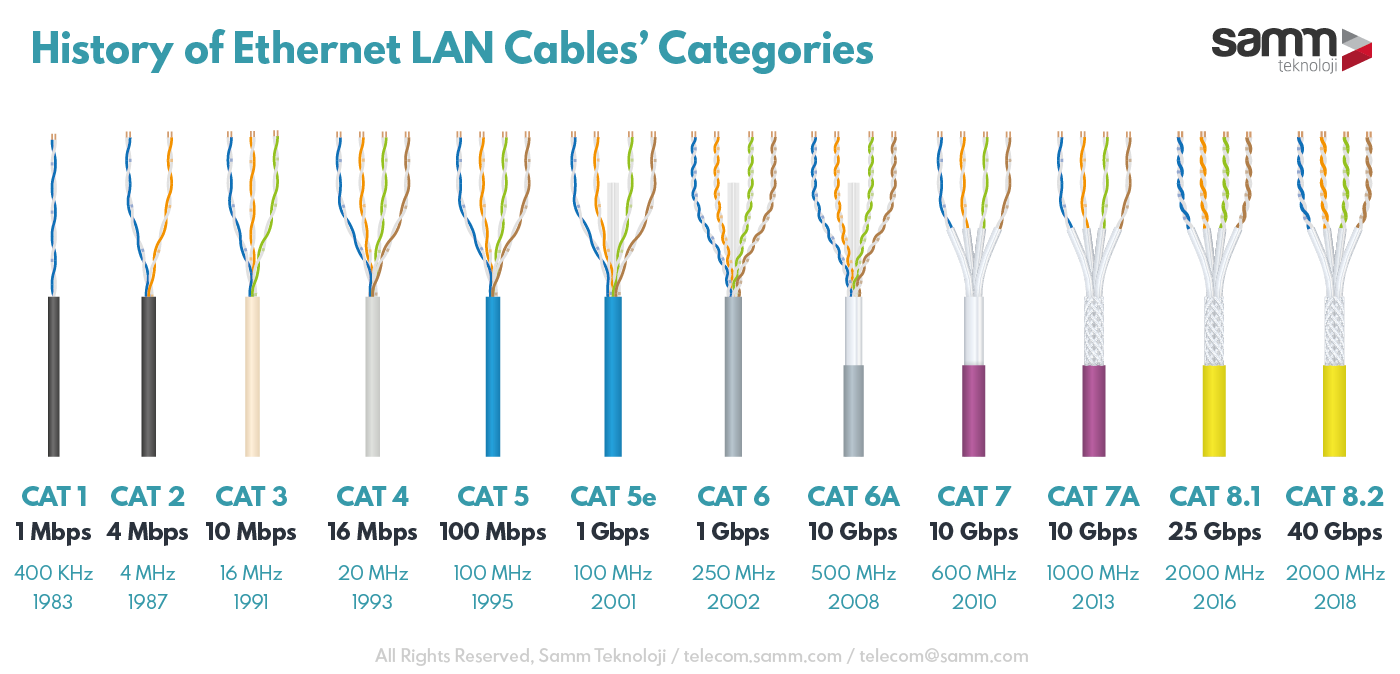
Table of Contents
- The Definitive Answer: Understanding the Cat8 30-Meter Channel
- Breaking Down the 30-Meter Channel: Permanent Link vs. Patch Cords
- Why is the Cat8 Cable Length So Much Shorter?
- The Science of Signal Attenuation
- The Role of Frequency (2000 MHz)
- Crosstalk and the Critical Need for Shielding
- How Does Cat8’s Distance Compare to Other Ethernet Categories?
- Where Should You Use Cat8 Cable? Unpacking the Ideal Applications
- The Data Center Sweet Spot
- Is Cat8 a Good Choice for Home or Office Networks?
- Key Factors to Consider for a Reliable Cat8 Installation
- Quality Components Matter
- Proper Termination and Connection
- Testing and Certification
- Frequently Asked Questions (FAQ) about Cat8 Cable Distance
- Conclusion: Maximizing Performance Within the 30-Meter Limit
The Definitive Answer: Understanding the Cat8 30-Meter Channel
When discussing Ethernet cable distances, it’s crucial to understand the concept of a “channel.” A channel represents the entire end-to-end connection, from a network switch to a server or device. According to the Telecommunications Industry Association (TIA) standards, the 30-meter limitation for Cat8 applies to this full channel. This is the maximum length at which the cable is guaranteed to perform at its specified 25GBASE-T or 40GBASE-T speeds without significant signal loss or errors.
This 30-meter distance is not arbitrary; it is the result of extensive engineering and testing to balance ultra-high frequency with signal integrity. Pushing a Cat8 cable beyond this specified limit will lead to a rapid drop-off in performance. The signal will degrade (a phenomenon called attenuation), and the connection will likely fail to negotiate the 40Gbps speed, reverting to a slower rate or failing to link altogether. For any professional installation, adhering strictly to this 30-meter maximum is non-negotiable for certified performance.
Breaking Down the 30-Meter Channel: Permanent Link vs. Patch Cords
To provide flexibility for installers, the 30-meter channel is further broken down. The TIA standard outlines a model that includes a “permanent link” and “patch cords.”
- Permanent Link (Up to 24 meters / 78 feet): This is the fixed portion of the cabling, typically installed inside walls, conduits, or under floors. This is the solid-conductor bulk cable that runs from a patch panel to a wall outlet or termination point.
- Patch Cords (Up to 6 meters / 20 feet total): This accounts for the flexible, stranded-conductor cables used to connect devices to the permanent link. For example, a patch cord from the switch to the patch panel and another from the wall outlet to a server. The standards allow for a total of 6 meters combined for these patch cords.
This 24m + 6m configuration gives network architects the ability to design data center layouts effectively while ensuring the total channel length does not exceed the critical 30-meter threshold. It’s a common misconception that you can simply run a single 30-meter cable; in practice, the permanent link is the primary consideration.
Why is the Cat8 Cable Length So Much Shorter?
The significant reduction in distance for Cat8 compared to Cat6A (100 meters) is rooted in physics and the challenges of transmitting data at extremely high frequencies over twisted-pair copper cabling. Three key factors are at play: signal attenuation, frequency, and crosstalk.
The Science of Signal Attenuation
Attenuation is the natural weakening of a signal as it travels along a cable. Think of it like shouting across a field—your voice gets quieter the farther it travels. In electrical terms, the cable itself has resistance that causes the signal’s energy to dissipate as heat. For a given cable design, the higher the frequency of the signal, the more severe the attenuation is over the same distance. To achieve 40Gbps, Cat8 must operate at a very high frequency, which inherently limits how far the signal can travel before it becomes too weak for the receiver to interpret correctly.
The Role of Frequency (2000 MHz)
Bandwidth, measured in Megahertz (MHz), is the capacity of the cable to carry signals. Category 8 operates at a massive bandwidth of 2000 MHz. Let’s put that in perspective:
- Cat6: 250 MHz
- Cat6A: 500 MHz
- Cat8: 2000 MHz
This 4x increase in frequency over Cat6A is what unlocks 40Gbps speeds, but it’s also the primary reason for the distance limitation. The 2000 MHz signals are much more susceptible to energy loss and degradation, forcing the standards to cap the length at 30 meters to ensure the signal remains strong enough from end to end.
Crosstalk and the Critical Need for Shielding
At 2000 MHz, the electromagnetic fields generated by the signal in each twisted pair are incredibly intense. This leads to a high potential for “crosstalk,” where the signal from one pair bleeds over and interferes with the signal on an adjacent pair. To combat this, all Cat8 cables are required to be shielded.
You will typically see Cat8 specified as S/FTP (Screened/Foiled Twisted Pair). This means there is an overall braided screen around all four pairs, and each individual pair is also wrapped in its own foil shield. This dual-shielding design is essential for isolating the pairs from each other (preventing internal crosstalk) and protecting the entire cable from external electromagnetic interference (EMI). Without this robust shielding, achieving 40Gbps at any meaningful distance would be impossible.
How Does Cat8’s Distance Compare to Other Ethernet Categories?
Context is key to understanding where Cat8 fits in the world of structured cabling. Its short distance makes it a specialist, while other categories remain the workhorses for general-purpose networking.
| Category | Max Speed | Bandwidth | Maximum Distance | Common Application |
|---|---|---|---|---|
| Cat5e | 1 Gbps | 100 MHz | 100 meters (328 feet) | Basic home & small office networks |
| Cat6 | 10 Gbps | 250 MHz | ~55 meters for 10G; 100 meters for 1G | Commercial offices, advanced home networks |
| Cat6A | 10 Gbps | 500 MHz | 100 meters (328 feet) | Future-proofed commercial & data center networks (10G) |
| Cat8 | 40 Gbps | 2000 MHz | 30 meters (98 feet) | Data centers (server-to-switch connections) |
Where Should You Use Cat8 Cable? Unpacking the Ideal Applications
Given its unique combination of extreme speed and short distance, Cat8 is not an all-purpose cable. Its use case is highly specific and targeted.
The Data Center Sweet Spot
Cat8 was developed explicitly for data center applications. Specifically, it excels as a cost-effective copper alternative to fiber optics for short-distance, inter-rack connections. The primary applications are:
- Top-of-Rack (ToR): Connecting servers within a single rack to a network switch located at the top of that same rack. These runs are very short, typically just a few meters, making Cat8 a perfect fit.
- End-of-Row (EoR) / Middle-of-Row (MoR): Connecting multiple server racks to a central aggregation switch placed at the end or in the middle of a row. As long as the total distance from the switch to the farthest server is within the 30-meter channel limit, Cat8 provides a high-speed copper solution.
In these environments, Cat8’s use of the familiar RJ45 connector is a significant advantage, reducing costs and simplifying installation compared to fiber optic transceivers and connectors.
Is Cat8 a Good Choice for Home or Office Networks?
For the vast majority of home and office installations, the answer is a firm no. The 30-meter distance limitation makes it impractical for “horizontal cabling”—the runs that go from a central patch panel to wall jacks in various rooms. These runs frequently exceed 30 meters.
Furthermore, most home and office devices cannot utilize 25Gbps or 40Gbps speeds. Attempting to “future-proof” a home with Cat8 is not a cost-effective or practical strategy. For new installations aiming for speeds beyond 1Gbps, Cat6A is the recommended standard. It provides 10Gbps speeds out to a full 100 meters, offering more than enough performance for the foreseeable future of residential and commercial applications.
Key Factors to Consider for a Reliable Cat8 Installation
Successfully deploying a 40Gbps Cat8 channel requires more than just the right cable. It demands a holistic approach where every component in the channel is up to the task.
Quality Components Matter
At 2000 MHz, there is zero room for error. Using a high-quality, certified Cat8 cable is imperative. Look for cables made with 100% pure bare copper conductors, like those offered by Dlaycable. Avoid cheap Copper Clad Aluminum (CCA) alternatives, which have higher resistance and will fail to perform at Cat8 specifications. The quality of the shielding, jacket material, and consistency of the twisted pairs all play a critical role.
Proper Termination and Connection
The cable is only one part of the equation. You must use connectors, keystone jacks, and patch panels that are specifically rated for Cat8. Using a Cat6A jack with a Cat8 cable will create a bottleneck and prevent the link from reaching its potential. The termination process itself must be precise to maintain the integrity of the cable’s shielding and twists right up to the point of contact.
Testing and Certification
For any mission-critical data center installation, the final step should be link certification. This requires specialized network cable testers (like the Fluke Networks DSX-8000) that can test up to the 2000 MHz frequency of Cat8. A simple “continuity” test is not sufficient. A certification test will verify that the entire 30-meter channel meets all the required performance parameters for 40GBASE-T, including attenuation, crosstalk (NEXT, PSNEXT), and return loss.
Frequently Asked Questions (FAQ) about Cat8 Cable Distance
- What happens if I run Cat8 cable longer than 30 meters?
- You will not get the certified 25/40Gbps performance. Due to severe signal attenuation, the link will likely fail to connect at its target speed. It may negotiate a slower speed (e.g., 10Gbps or 1Gbps) or fail to establish a stable connection entirely.
- Does Cat8 cable use a standard RJ45 connector?
- Yes, Cat8 uses the standard RJ45 connector interface. This is a key advantage, as it maintains backward compatibility and simplifies connections compared to fiber optics.
- Is Cat8 backward compatible with older network equipment?
- Absolutely. You can plug a Cat8 cable into devices designed for Cat6A, Cat6, or Cat5e. The connection will simply operate at the maximum speed supported by the slowest component (the device’s network port).
- Is Cat8 better than fiber optic cable?
- It depends on the application. For short-run (sub-30m) data center connections, Cat8 can be more cost-effective and easier to install. For distances longer than 30 meters, or in environments with very high electromagnetic interference, fiber optic cable is the superior choice as it can transmit data over many kilometers and is immune to EMI.
Conclusion: Maximizing Performance Within the 30-Meter Limit
To summarize, the maximum distance for a Cat8 Ethernet cable is a firm 30 meters (98 feet). This limitation is an intentional design choice to enable staggering 40Gbps data speeds over copper cabling by operating at an ultra-high 2000 MHz frequency.
While its short range makes it unsuitable for general home or office wiring, Cat8 is the new king of copper for high-demand, short-haul applications within the data center. When deployed correctly—using high-quality, certified components and adhering to the 30-meter channel rule—Cat8 provides a powerful and cost-effective solution for building the next generation of high-speed networks. For any professional building or upgrading a data center infrastructure, understanding this distance limitation is the first step to harnessing the full power of Category 8.