


Yes, a Cat8 cable will physically plug into a Cat6 or Cat6a jack, port, or keystone. Both Category 8 and Category 6 cables use the universal RJ45 connector, making them physically compatible. However, connecting a Cat8 cable to a Cat6 system will not grant you Cat8 speeds; your network’s performance will be limited to the capabilities of the Cat6 standard. This is known as the “bottleneck effect,” where the entire network path defaults to the lowest-performing component.
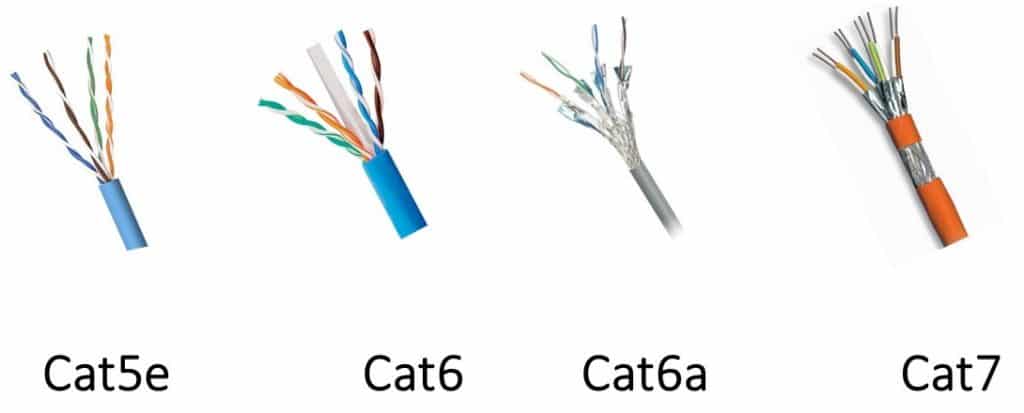
Understanding this distinction between physical fit and performance capability is crucial for building an efficient and cost-effective network. While the connectors are identical, the internal technology, construction, and intended applications of Cat6 and Cat8 cables are vastly different. Here at D-Lay Cable, we believe in empowering our customers with the knowledge to make the right choice for their specific needs, ensuring you invest in hardware that delivers the performance you expect without overspending on features you can’t use.
Table of Contents
- The Simple Answer: Physical vs. Performance Compatibility
- A Deeper Dive: Cat8 vs. Cat6 at a Glance
- Understanding the Core Differences: What Sets Cat8 and Cat6 Apart?
- So, When Should You Actually Use a Cat8 Cable?
- What Happens When You Mix Other Cable Categories?
- The Verdict: Making the Right Choice for Your Network
- Frequently Asked Questions (FAQ)
The Simple Answer: Physical vs. Performance Compatibility
When asking if a Cat8 cable can plug into a Cat6 jack, we’re really asking two questions. First, will it physically connect? Second, how will it perform? Let’s break down the answers.
The Universal RJ45 Connector: The Reason They Fit
All modern Ethernet cables, from the older Cat5e to the cutting-edge Cat8, utilize the same standardized plug: the RJ45 connector. This 8-position, 8-contact (8P8C) modular connector has been the backbone of wired networking for decades. Its universal design ensures that any Ethernet cable with an RJ45 plug can be inserted into any device with an RJ45 port, whether it’s on a router, a switch, a computer, or a wall plate. So, from a purely physical standpoint, Cat8 and Cat6 are perfectly interchangeable.
The Bottleneck Effect: Why You Won’t Get Cat8 Speeds
While the cable will connect, the performance is a different story. A network is only as fast as its slowest component. Think of it like a highway: if a four-lane superhighway (Cat8) suddenly narrows down to a two-lane road (Cat6), traffic can only move at the speed the two-lane road allows. In networking, this is the bottleneck effect.
When you plug a Cat8 cable—designed for speeds up to 40Gbps—into a network composed of Cat6 jacks, patch panels, and switches, the entire connection will be limited to the Cat6 standard of 1Gbps (or up to 10Gbps over very short distances). The advanced shielding and tightly twisted copper pairs inside the Cat8 cable will not be utilized to their full potential. You’ve essentially installed a premium component that is being forced to underperform.
A Deeper Dive: Cat8 vs. Cat6 at a Glance
To truly appreciate the differences and understand why mixing them has performance implications, it helps to see their specifications side-by-side. This table highlights the key metrics that define each category.
| Specification | Category 6 (Cat6) | Category 8 (Cat8) |
|---|---|---|
| Max Speed (Data Rate) | 1 Gbps (up to 10 Gbps at <55 meters) | 25 Gbps (25GBASE-T) or 40 Gbps (40GBASE-T) |
| Max Bandwidth (Frequency) | 250 MHz | 2000 MHz (2 GHz) |
| Max Distance | 100 meters (328 ft) for 1 Gbps | 30 meters (98 ft) for 25/40 Gbps |
| Shielding | Typically Unshielded (UTP), but Shielded (STP) is available. | Always Shielded (S/FTP or F/FTP) to handle high frequencies. |
| Recommended Application | Home networks, small to medium offices, general-purpose installations. | Data centers, server rooms, short-distance switch-to-switch links. |
| Relative Cost | Standard / Affordable | Premium / Expensive |
Understanding the Core Differences: What Sets Cat8 and Cat6 Apart?
The table above shows the numbers, but what do they mean in a practical sense? The differences in speed, shielding, and application are fundamental to each cable’s design.
Speed and Bandwidth: The Data Superhighway
Bandwidth, measured in Megahertz (MHz), is like the number of lanes on a highway. Speed, measured in Gigabits-per-second (Gbps), is the speed limit on those lanes. Cat6 operates at 250 MHz, providing a solid foundation for 1 Gbps speeds, which is more than sufficient for most home internet connections, streaming 4K video, and online gaming. Cat8, on the other hand, operates at a massive 2000 MHz (2 GHz) bandwidth. This eight-fold increase is what allows it to support staggering 40 Gbps data rates, but only over a short distance of 30 meters. This high performance is tailored for transferring massive datasets between servers and switches in a professional environment.
Shielding and Construction: Built for Different Environments
To achieve its incredible 2 GHz frequency, Cat8 cables require extensive shielding. Every Cat8 cable is a shielded cable, typically using S/FTP (Screened/Foiled Twisted Pair) construction. This means each of the four twisted pairs of copper wire is wrapped in its own foil shield, and then a larger, overall braid screen wraps around all four pairs. This robust shielding is essential to prevent “crosstalk” (interference between wire pairs) and interference from external electromagnetic sources (EMI) at such high frequencies.
Cat6 cables are most commonly Unshielded Twisted Pair (UTP), which is perfectly adequate for the lower 250 MHz frequency in typical home and office settings where EMI is not a major concern. While shielded Cat6 (STP) exists for noisy environments, it is not a default feature like it is with Cat8.
Intended Application: Data Center vs. Home and Office
The core difference boils down to purpose. Cat8 was designed for the data center. Its purpose is to provide high-speed, short-distance links between servers, switches, and storage area networks. Its 30-meter distance limitation and high cost make it impractical and unnecessary for most other applications.
Cat6 (and its successor, Cat6a) is the workhorse for horizontal cabling runs in homes and offices. It provides reliable 1 Gbps performance up to 100 meters, which covers the vast majority of residential and commercial needs. For those needing 10 Gbps speeds, Cat6a is the TIA-certified standard for achieving that performance over the full 100-meter distance.
So, When Should You Actually Use a Cat8 Cable?
Given that a Cat8 cable is overkill for a Cat6 network, you might wonder what its proper use case is. The answer is specific and targeted.
The Ideal Scenario: Data Centers and 25G/40G Networks
You should only invest in a complete Cat8 cabling solution (cables, jacks, patch panels) if you are building or upgrading a network that uses 25GBASE-T or 40GBASE-T equipment. This is almost exclusively found in professional data centers or enterprise-level networking closets where top-of-rack switching is implemented. In these environments, speed is paramount, and the 30-meter distance is not a limitation for connecting servers in a single rack to a switch.
Is Cat8 “Future-Proofing” for a Home Network?
A common misconception is that buying the “best” cable, like Cat8, is a good way to “future-proof” a home network. For the foreseeable future, this is not the case. Most consumer-grade equipment (routers, modems, PCs) tops out at 1 Gbps, 2.5 Gbps, or 10 Gbps ports. Internet service provider speeds for residential customers are also well below the 40 Gbps threshold of Cat8. A high-quality Cat6a cable is a much more practical and cost-effective way to future-proof a home network, as it fully supports 10 Gbps speeds over 100 meters, a benchmark that will remain relevant for many years to come.
What Happens When You Mix Other Cable Categories?
The bottleneck principle applies to all Ethernet categories. Understanding this helps in making smart decisions across your entire network.
Using Cat6 Cable with Cat8 Equipment
The reverse scenario is also possible. If you have a 40 Gbps switch and server (Cat8 equipment) but connect them with a Cat6 cable, the connection will once again default to the cable’s capability: 1 Gbps. You have high-performance ports that are being “starved” for data by a cable that cannot keep up. This highlights the importance of matching all components in a high-speed channel.
What About Cat6a or Cat7?
Plugging a Cat8 cable into a Cat6a system will result in the network running at Cat6a speeds (10 Gbps up to 100 meters). This is still a performance downgrade from Cat8, but better than Cat6. Cat7 is an older, non-TIA-standardized category that also offered 10 Gbps but is now largely superseded by Cat6a for commercial installations and Cat8 for data centers. The same compatibility rules apply: they are all physically compatible via the RJ45 connector, but performance defaults to the lowest category in the chain.
The Verdict: Making the Right Choice for Your Network
To circle back to our original question: Will a Cat8 cable plug into a Cat6 jack? Yes. Should you do it? Probably not.
Using a Cat8 cable in a Cat6 infrastructure offers no performance benefit and is a poor use of resources. The key to a successful network deployment is to create a balanced system where every component—cables, jacks, patch panels, and switches—is rated for the same performance level.
Our recommendation at D-Lay Cable is straightforward:
- For standard home and office networks requiring speeds up to 1 Gbps, our high-quality Cat6 cables are the perfect, reliable, and cost-effective choice.
- For users building a new network or upgrading to support 10 Gbps speeds, now or in the future, our Cat6a cables are the ideal solution, providing full 10G performance over 100 meters.
- For professional IT managers deploying 25GBASE-T or 40GBASE-T networks in a data center, our certified Cat8 cables and components will deliver the mission-critical performance you require.
Frequently Asked Questions (FAQ)
1. Can I use a Cat8 cable for gaming on a Cat6 network?
Yes, you can, but it will not improve your gaming performance. Your connection speed will be limited by your Cat6 network components and your internet plan. For gaming, a low-latency, stable connection is more important than raw bandwidth beyond what Cat6 already provides. A quality Cat6 or Cat6a cable is more than sufficient.
2. Is a Cat8 cable worth the extra cost for a home setup?
No, for a typical home setup, a Cat8 cable is not worth the extra cost. Cat6 is sufficient for 1 Gbps internet and Cat6a is the best choice for future-proofing for 10 Gbps speeds. The features of Cat8 (40 Gbps over a short distance) cannot be utilized by any consumer-grade home networking equipment on the market today.
3. Will a Cat8 cable improve my internet speed delivered by my ISP?
No. Your internet speed is determined by the plan you purchase from your Internet Service Provider (ISP). A Cat8 cable cannot make a 500 Mbps internet plan run any faster. It can only ensure that your local network (between your router and devices) is not a bottleneck, a job that Cat6 and Cat6a already do perfectly for current internet speeds.